If you’re looking for the best external RAID systems for editing in 2026, I recommend considering options like the LaCie Rugged Raid, SanDisk G-RAID Project 2, and flexible enclosures from ORICO, GODO, and MAIWO. These deliver high-capacity storage, fast transfer speeds, and reliable RAID modes that suit demanding workflows. Choosing the right one depends on your needs for speed, security, and durability. Keep exploring, and you’ll find the perfect fit for your setup.
Key Takeaways
- Prioritize systems with high transfer speeds (up to 520MB/s) for efficient large media file handling.
- Choose enclosures supporting multiple RAID modes (RAID 0, 1, 5) for performance and data security flexibility.
- Opt for models with robust cooling solutions and low noise levels for optimal operation in quiet editing environments.
- Ensure compatibility with USB 3.0, USB-C, or Thunderbolt 3 for versatile, high-speed connectivity.
- Consider portable options with rugged designs and security features like encryption for on-the-go editing needs.
| 4-Bay RAID Hard Drive Enclosure with Cooling Fan |  | High-Capacity Powerhouse | Capacity: Up to 80TB (20TB per drive) | RAID Support: 8 modes (RAID 0,1,3,5,10,CLONE,LARGE,NORMAL) | Connectivity: USB 3.0, eSATA | VIEW LATEST PRICE | See Our Full Breakdown |
| LaCie Rugged Raid 8TB External Hard Drive | 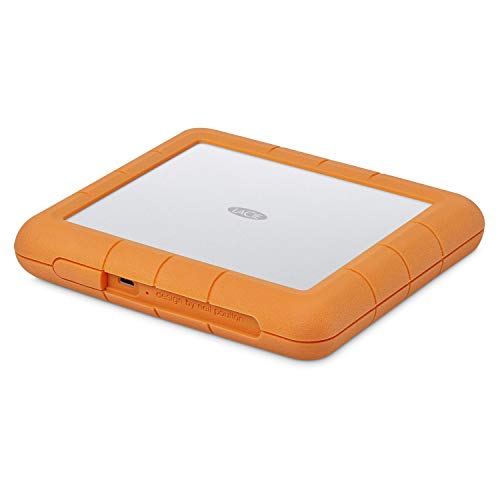 | Portable Performance | Capacity: 8TB total | RAID Support: RAID 0/1 | Connectivity: USB-C, USB 3.0 | VIEW LATEST PRICE | See Our Full Breakdown |
| ORICO 4-Bay RAID External Hard Drive Enclosure |  | Flexible RAID Options | Capacity: Up to 88TB (22TB per disk) | RAID Support: 8 modes (RAID 0,1,3,5,10,JBOD,CLONE,CLEAR) | Connectivity: USB 3.0 | VIEW LATEST PRICE | See Our Full Breakdown |
| SanDisk 52TB G-RAID Project 2 External Hard Drive |  | Enterprise-Ready Speed | Capacity: 52TB total | RAID Support: RAID 0 (RAID 0 only) | Connectivity: Thunderbolt 3, USB 3.2 Gen 2×1 | VIEW LATEST PRICE | See Our Full Breakdown |
| Dual Bay Aluminum RAID Enclosure with Cooling Fan |  | Compact & Efficient | Capacity: 16TB total (8TB per bay) | RAID Support: 4 modes (RAID 0,1,JBOD,NORMAL) | Connectivity: USB 3.0 | VIEW LATEST PRICE | See Our Full Breakdown |
| ORICO RAID 5 Bay External HDD Enclosure |  | Budget-Friendly Reliability | Capacity: Up to 110TB (22TB per drive) | RAID Support: 8 modes (0,1,3,5,10,JBOD,CLONE,CLEAR) | Connectivity: USB 3.0 | VIEW LATEST PRICE | See Our Full Breakdown |
| LaCie 2big RAID 16TB External Hard Drive |  | Advanced Storage Solution | Capacity: 16TB total | RAID Support: RAID 0/1 | Connectivity: USB-C, USB 3.0 | VIEW LATEST PRICE | See Our Full Breakdown |
| GODO 3.5″ Dual Bay SATA HDD Enclosure |  | Heavy-Duty Design | Capacity: Up to 40TB (20TB per bay) | RAID Support: 4 modes (RAID 0,1,JBOD,NORMAL) | Connectivity: USB 3.0 Type-C | VIEW LATEST PRICE | See Our Full Breakdown |
| MAIWO Dual Bay RAID Hard Drive Enclosure |  | User-Friendly Setup | Capacity: 16TB total | RAID Support: 4 modes (RAID 0,1,LARGE,NORMAL) | Connectivity: USB 3.0 | VIEW LATEST PRICE | See Our Full Breakdown |
| SanDisk 24TB G-RAID External Hard Drive |  | Professional Workhorse | Capacity: Up to 48TB (24TB per drive) | RAID Support: RAID 0 (pre-configured) | Connectivity: Thunderbolt 3, USB 3.2 Gen 2×1 | VIEW LATEST PRICE | See Our Full Breakdown |
More Details on Our Top Picks
-
LaCie Rugged Raid Shuttle 8TB External Hard Drive Portable HDD - USB-C USB 3.0 Compatible, Drop Shock Dust Water Resistant, for Mac and PC Computer Desktop Laptop, 1 Mo Adobe CC (STHT8000800)
Store, pack, and send out content like never before with 8TB of massive capacity in a Rugged external...
As an affiliate, we earn on qualifying purchases.
4-Bay RAID Hard Drive Enclosure with Cooling Fan
If you’re an editor looking for a reliable external RAID system that can handle demanding workloads, the 4-Bay RAID Hard Drive Enclosure with Cooling Fan is an excellent choice. It supports both 2.5 and 3.5-inch HDDs and SSDs, with a maximum capacity of 80TB, perfect for heavy-duty editing tasks. Made from durable aluminum-alloy, it features 2-inch fans that keep temperatures low during prolonged use. While the noise levels are around 40-50 decibels, it’s a small trade-off for efficient cooling. With support for 8 RAID modes, USB 3.0, eSATA, and a stable power supply, it offers versatile, high-speed performance.
- Capacity:Up to 80TB (20TB per drive)
- RAID Support:8 modes (RAID 0,1,3,5,10,CLONE,LARGE,NORMAL)
- Connectivity:USB 3.0, eSATA
- Cooling System:Aluminum alloy with 2-inch fans
- Compatibility:Windows, Linux; no Mac OS software
- Power & Support:12V adapter, technical support within 24h
- Additional Feature:Aluminum-Alloy construction
- Additional Feature:No RAID software for Mac
- Additional Feature:Supports multiple RAID modes
-
ORICO 4-Bay RAID External Hard Drive Enclosure USB 3.0 for 2.5/3.5 Inch SATA HDD/SSD, Supports Up to 22TB, RAID 0/1/3/5/10/JBOD, 5Gbps Transfer, Silent Cooling Fan
[Flexible RAID Mode Management]: This RAID external hard drive enclosure supports eight RAID configurations, including RAID 0, 1,...
As an affiliate, we earn on qualifying purchases.
LaCie Rugged Raid 8TB External Hard Drive
The LaCie Rugged Raid 8TB External Hard Drive stands out as an ideal choice for editors who need reliable, portable storage with flexible RAID options. Its compact design fits easily in gear bags or shipping envelopes, making it perfect for on-the-go editing. Compatible with USB-C and USB 3.0, it works seamlessly with Mac and PC systems. Easy-to-use RAID configuration wizard allows quick setup of RAID 0 or 1 for performance or redundancy. Plus, its self-encrypting password system keeps your projects secure. With 8TB of capacity and a one-month Adobe Creative Cloud membership, it’s a versatile, secure, and portable solution for demanding editing workflows.
- Capacity:8TB total
- RAID Support:RAID 0/1
- Connectivity:USB-C, USB 3.0
- Cooling System:Not specified
- Compatibility:Mac, Windows
- Power & Support:Not specified
- Additional Feature:Portable rugged design
- Additional Feature:Self-encrypting password system
- Additional Feature:Includes Adobe Creative Cloud
-
SanDisk Professional 52TB G-RAID Project 2 - External Hard Drive HDD, Thunderbolt 3, USB (10Gbps), 7200RPM Ultrastar Hard Drive, Up to 540MB/s Read - SDPHK2H-052T-NBAAD
(1) 1GB = 1 billion bytes and 1TB = 1 trillion bytes. Actual user capacity may be less...
As an affiliate, we earn on qualifying purchases.
ORICO 4-Bay RAID External Hard Drive Enclosure
Editors seeking a versatile, high-capacity RAID enclosure will appreciate the ORICO 4Bay RAID External Hard Drive Enclosure’s flexibility and robust performance. This model supports both 2.5 and 3.5-inch SATA drives, offering up to 88TB of storage across five bays. Its eight RAID modes, including RAID 0, 1, 5, and 10, allow tailored data management and security. The USB 3.0 interface delivers transfer speeds up to 235MB/s, while the aluminum and ABS construction guarantees durability and effective cooling with an 80mm silent fan. Compatible with Windows, macOS, and Linux, it’s a reliable choice for demanding editing workflows.
- Capacity:Up to 88TB (22TB per disk)
- RAID Support:8 modes (RAID 0,1,3,5,10,JBOD,CLONE,CLEAR)
- Connectivity:USB 3.0
- Cooling System:Aluminum and ABS, with fan
- Compatibility:Windows, Mac, Linux
- Power & Support:150W power supply, support available
- Additional Feature:Supports up to 88TB
- Additional Feature:Front/rear vented cooling
- Additional Feature:Fully compatible with Windows/macos/Linux
SanDisk 52TB G-RAID Project 2 External Hard Drive
For editors working with massive 4K, 8K, or VR workflows, the SanDisk 52TB G-RAID Project 2 stands out as a high-performance external RAID solution. It features two 7200RPM Ultrastar enterprise drives in RAID 0, delivering up to 520MB/s read and 510MB/s write speeds. Connectivity options include Thunderbolt 3 and USB 10Gbps, ensuring versatile and fast data transfer. The PRO-BLADE SSD Mag slot allows quick addition of SSDs for faster editing and backups. With a capacity of 52TB, this drive handles large media files effortlessly, making it ideal for professional editors demanding reliable, speedy storage.
- Capacity:52TB total
- RAID Support:RAID 0 (RAID 0 only)
- Connectivity:Thunderbolt 3, USB 3.2 Gen 2×1
- Cooling System:Not specified
- Compatibility:Mac, Windows, Linux, Android
- Power & Support:Not specified
- Additional Feature:Thunderbolt 3 connectivity
- Additional Feature:PRO-BLADE SSD Mag slot
- Additional Feature:Includes one-month Creative Cloud
Dual Bay Aluminum RAID Enclosure with Cooling Fan
When managing large video files or demanding editing workflows, reliable data security and efficient cooling become essential. The Dual Bay Aluminum RAID Enclosure with Cooling Fan offers a solid solution, supporting 2.5” and 3.5” SATA drives up to 20TB each. Its aluminum construction guarantees durability and helps dissipate heat, while the built-in 2-inch fan maintains ideal temperatures. With four RAID modes—including RAID 0 and 1—you can customize data protection. The tool-free design simplifies installation, and the USB 3.0 interface delivers transfer speeds up to 5Gbps. It’s a compact, sturdy, and versatile option for editors prioritizing security and cooling.
- Capacity:16TB total (8TB per bay)
- RAID Support:4 modes (RAID 0,1,JBOD,NORMAL)
- Connectivity:USB 3.0
- Cooling System:Aluminum with silent fan
- Compatibility:Windows, Mac
- Power & Support:Not specified
- Additional Feature:Tool-free HDD installation
- Additional Feature:Aluminum alloy chassis
- Additional Feature:Supports 4 RAID modes
ORICO RAID 5 Bay External HDD Enclosure
The ORICO RAID 5 Bay External HDD Enclosure stands out as a robust storage solution for professionals who need reliable, high-capacity data management. It supports up to 110TB across multiple drives, with a maximum of 22TB per disk, making it ideal for large projects. Its eight RAID modes, including RAID 5, provide flexible backup options and enhanced data security. The enclosure features a USB 3.0 interface, delivering transfer speeds up to 5Gbps, and is built from durable aluminum with an 80mm silent fan for efficient cooling. Its safety locks and easy assembly make it a practical choice for editors demanding both performance and reliability.
- Capacity:Up to 110TB (22TB per drive)
- RAID Support:8 modes (0,1,3,5,10,JBOD,CLONE,CLEAR)
- Connectivity:USB 3.0
- Cooling System:Aluminum with silent fan
- Compatibility:Windows, Mac, Linux
- Power & Support:150W power supply, support available
- Additional Feature:Safety locking mechanism
- Additional Feature:Supports 110TB total capacity
- Additional Feature:Aluminum construction for durability
LaCie 2big RAID 16TB External Hard Drive
Photographers, indie filmmakers, and YouTubers seeking a reliable, high-capacity external RAID solution will find the LaCie 2big RAID 16TB ideal. It offers up to 16TB of storage with speeds reaching 440MB/s, perfect for demanding workflows. Compatible with USB-C and USB 3.0, it’s easy to set up and configure in RAID 0 or 1, balancing performance and redundancy. Built with hot-swappable IronWolf Pro drives, it guarantees long-term reliability. Plus, with a five-year warranty and Rescue Data Recovery Services, it provides peace of mind. Its user-friendly wizard makes it straightforward to customize, making it a solid choice for professional editors.
- Capacity:16TB total
- RAID Support:RAID 0/1
- Connectivity:USB-C, USB 3.0
- Cooling System:Not specified
- Compatibility:Mac, PC
- Power & Support:Not specified
- Additional Feature:Enterprise-class, hot-swappable drives
- Additional Feature:Five-year warranty
- Additional Feature:User-friendly RAID setup wizard
GODO 3.5″ Dual Bay SATA HDD Enclosure
Editors seeking a reliable, high-capacity RAID enclosure will find the GODO 3.5″ Dual Bay SATA HDD Enclosure to be a top choice. It supports up to 40TB, with each bay handling 20TB, making it perfect for large editing projects. The enclosure offers four RAID modes—RAID 0, RAID 1, JBOD, and NORMAL—easy to switch via a dedicated switch. Its USB 3.0 Type-C connection delivers data transfer speeds of up to 5Gbps. Built from durable aluminum with a silent fan and ventilation, it guarantees excellent heat management and drive safety. Compatibility spans Windows, Mac, Linux, and Android, providing versatile connectivity for any workflow.
- Capacity:Up to 40TB (20TB per bay)
- RAID Support:4 modes (RAID 0,1,JBOD,NORMAL)
- Connectivity:USB 3.0 Type-C
- Cooling System:Aluminum with cooling vents
- Compatibility:Windows, Mac, Linux
- Power & Support:Not specified
- Additional Feature:Ventilation openings
- Additional Feature:Supports multiple OS
- Additional Feature:Aluminum full-body design
MAIWO Dual Bay RAID Hard Drive Enclosure
For professionals seeking a reliable and versatile storage solution, the MAIWO Dual Bay RAID Hard Drive Enclosure stands out with its support for multiple RAID modes and high-speed data transfer. It accommodates 2.5-inch SATA SSDs and HDDs up to 16TB, offering flexible configurations like RAID 0, RAID 1, LARGE, and NORMAL. Its USB 3.0 interface delivers transfer speeds up to 5Gbps, compatible with UASP protocol on Windows 8 and above. The tool-free design makes setup simple, while features like hot swapping, LED indicators, and a durable ABS plastic build enhance usability. It’s an excellent choice for editors needing fast, reliable, and adaptable external storage.
- Capacity:16TB total
- RAID Support:4 modes (RAID 0,1,LARGE,NORMAL)
- Connectivity:USB 3.0
- Cooling System:Aluminum with fan
- Compatibility:Windows, Mac
- Power & Support:Not specified
- Additional Feature:Sliding closure design
- Additional Feature:Built-in sponge pad
- Additional Feature:Supports hot swapping
SanDisk 24TB G-RAID External Hard Drive
If you’re handling demanding editing workflows that require large, fast storage, the SanDisk 24TB G-RAID Project 2 stands out as an excellent choice. This external HDD offers up to 48TB of storage with two 7200RPM Ultrastar drives, ensuring reliable performance. Its transfer speeds reach up to 540MB/s in RAID 0, making it ideal for 4K, 8K, and VR projects. The drive features Thunderbolt 3 and USB 3.2 Gen 2×1 interfaces, providing versatile connectivity. Its sleek Space Grey design includes a PRO-BLADE SSD Mag slot for expansion, making it a flexible, high-performance solution for professional editors.
- Capacity:Up to 48TB (24TB per drive)
- RAID Support:RAID 0 (pre-configured)
- Connectivity:Thunderbolt 3, USB 3.2 Gen 2×1
- Cooling System:Not specified
- Compatibility:Windows, Mac
- Power & Support:Not specified
- Additional Feature:RAID 0 preconfigured
- Additional Feature:PRO-BLADE SSD Mag slot
- Additional Feature:Color-coded cable indicators
Factors to Consider When Choosing an External RAID Hard Drive System for Editors

When choosing an external RAID system, I focus on how much storage I need and how fast data transfers will be. I also consider the RAID modes available, since flexibility can impact future workflows, and I pay attention to noise levels and cooling to keep my workspace comfortable. Finally, I check that the drive is compatible with my setup and offers solid connectivity options for reliable performance.
Storage Capacity Needs
Selecting an external RAID hard drive system hinges on understanding your storage capacity needs, which can vary widely based on your projects. For editors working with 4K, 8K, or VR content, larger capacities are essential to handle massive files efficiently. Storage needs can range from as little as 16TB for smaller projects to over 100TB for extensive workflows. When choosing, consider the maximum capacity per drive supported by the enclosure—some systems support up to 22TB per disk—since this influences total capacity. The number of bays also impacts storage potential; more bays mean more drives and higher capacity. Additionally, plan for future growth, ensuring your setup can expand as your project demands increase over time.
Data Transfer Speeds
For editors working with large, high-resolution files, data transfer speed is a critical factor in choosing an external RAID system. Faster speeds mean less waiting and smoother workflows. USB 3.0 can reach up to 5Gbps, but newer interfaces like Thunderbolt offer up to 40Gbps, ideal for demanding video editing. RAID configurations also matter; RAID 0 stripes data across drives for speed, while RAID 1 prioritizes redundancy, which can slow transfer rates. Drive RPMs influence performance too—7200 RPM drives generally read and write faster than 5400 RPM ones. Additionally, protocols like UASP improve data handling, reducing latency and increasing transfer rates. When selecting a system, balancing interface type, RAID setup, and drive specs guarantees peak speeds for your editing needs.
RAID Mode Flexibility
Choosing the right RAID mode on an external hard drive system can greatly impact your editing workflow. Many systems support multiple configurations, typically between four and eight modes, giving you the flexibility to tailor your setup for speed or data protection. RAID 0 boosts performance, ideal for quick editing, while RAID 1 offers redundancy to safeguard your files. Some systems also include JBOD mode, allowing drives to operate independently, which can be useful for managing different project types. Keep in mind, switching modes often requires backing up data and resetting the drive, so understanding each mode’s implications is key. Additionally, verify software compatibility with your operating system, as limited support can restrict your options and affect your workflow flexibility.
Noise and Cooling Levels
When evaluating external RAID hard drive systems, paying attention to noise and cooling levels is essential, especially in quiet editing environments. Some models have cooling fans that operate at 40-50 decibels, which can be disruptive during delicate work. Effective cooling is vital for maintaining performance and extending the lifespan of the system; many enclosures use aluminum alloy and larger fans, like 80mm, to dissipate heat efficiently. Ventilation openings and multiple cooling features help prevent thermal throttling, ensuring consistent data transfer speeds during intensive editing. While some systems offer silent operation, others produce noticeable noise under heavy loads. Choosing a system with strong heat management and quieter fans can greatly improve your editing experience, especially in noise-sensitive settings.
Compatibility and Connectivity
Selecting an external RAID hard drive system that works seamlessly with your setup hinges on understanding its compatibility and connectivity options. First, verify it’s compatible with your operating system—Windows, macOS, or Linux—as compatibility can differ. Look for systems supporting USB 3.0 or higher; these offer faster data transfer rates, up to 5Gbps, which speeds up editing workflows with large files. Connectivity options like USB-C and Thunderbolt 3 are ideal—they provide both speed and versatility, making it easier to connect to various devices. Also, consider the number of drive bays; more bays often mean greater storage capacity and support for different RAID configurations. Finally, check for user-friendly features like plug-and-play setup, which simplifies integration into your existing editing environment.
Frequently Asked Questions
How Does RAID Level Selection Impact Data Safety and Performance?
Choosing the right RAID level directly affects my data safety and performance. For example, RAID 0 boosts speed by striping data across drives but offers no redundancy, risking data loss. RAID 5 balances performance and safety with parity, protecting against drive failure. I always consider my needs—faster workflows or critical data security—before selecting a RAID level, ensuring I get the best mix for my projects.
What Are the Best Practices for RAID System Maintenance?
Did you know regular maintenance can reduce RAID failures by up to 50%? I recommend scheduling routine checks, updating firmware, and monitoring disk health consistently. Always back up data before performing maintenance, and keep firmware and drivers current to prevent issues. I also suggest testing your RAID setup periodically to ascertain everything runs smoothly. Staying proactive with these practices helps protect your data and keeps your system performing at its best.
How Compatible Are These External RAID Drives With Different Editing Software?
These external RAID drives are highly compatible with most editing software, including Adobe Premiere Pro, Final Cut Pro, and DaVinci Resolve. I’ve found they work seamlessly across various platforms, especially when formatted correctly. Just make certain your drive uses a supported file system like exFAT or APFS, and I recommend checking your software’s specifications for best compatibility. This way, you avoid any hiccups during editing sessions.
What Is the Typical Lifespan of External RAID Drives Under Heavy Use?
External RAID drives typically last around 3 to 5 years with heavy use, but this can vary based on quality, usage patterns, and environmental conditions. I recommend regularly backing up data and monitoring drive health to prevent data loss. Proper maintenance and choosing high-quality drives can extend their lifespan, ensuring you get the most out of your investment in demanding editing workflows.
Are There Any Security Features Available in These External RAID Systems?
Yes, many external RAID systems come with security features like hardware encryption, password protection, and even biometric access. I always look for these options to keep my data safe from unauthorized access. Some models also offer remote management and automatic backups, which add an extra layer of security. Investing in a system with robust security features gives me peace of mind, knowing my valuable footage stays protected.
Conclusion
Choosing the right external RAID system is like building a sturdy bridge for your creative journey—you want it reliable, fast, and durable. I once trusted a RAID enclosure during a critical project, and it never let me down, saving hours of stress. Remember, your hard drives are the foundation of your work, so pick one that supports your flow and protects your data. With the right system, you’ll feel confident crossing any deadline’s chasm.