The Brother P-Touch PT-D210 is my best overall label maker pick for buyers who want a practical keyboard-based machine, while the Nelko P21 suits phone-first label design and the DYMO LetraTag 100H keeps basic handheld labeling simple. The main choice is between an onboard keyboard and a mobile app, followed by tape compatibility, portability, and how much formatting control you need. The lineup also includes compact personal models and options aimed at repeat home or office labeling. Read on for the full breakdown and to find the label maker that fits your routine.

Prime made for students and young adults
- Fast, free delivery for dorm and study essentials
- Prime Video and Amazon Music included
- Member-only deals
Key Takeaways
- The PT-D210 is the most balanced keyboard pick: it offers a familiar standalone workflow, while the PTD220 is the everyday home and office alternative.
- Bluetooth models trade button-based simplicity for phone editing: the Nelko P21 and Phomemo M150 are aimed at buyers who want to design labels from an app.
- Tape compatibility should guide the purchase: Brother P-Touch, DYMO LetraTag, DYMO D1, and Btag are distinct tape families, so supplies are not interchangeable.
- Bundles vary in practical value: several picks include multiple tapes, which helps buyers start labeling right away, but the included tape type should match the intended use.
- Personal and portable models serve different routines: compact handhelds suit occasional household labels, while keyboard and app options give more flexibility for ongoing organization.
| DYMO LetraTag 100H Handheld Label Maker with 3 Bonus Tapes |  | Best for Simple Home Organization | Model: LetraTag 100H | Type: Handheld label maker | Display: Graphical | VIEW ON AMAZON | See Our Full Breakdown |
| Nelko P21 Bluetooth Label Maker Machine with Tape |  | Best App-Based Pick | Connectivity: Bluetooth | Compatibility: iOS and Android; not compatible with Android 14 phones or computers | Print technology: BPA-free direct thermal | VIEW ON AMAZON | See Our Full Breakdown |
| Brother PT-M95 P-Touch Monochrome Label Maker Bundle with 4 Label Tapes |  | Best for Keyboard Simplicity | Model: PT-M95 | Keyboard: QWERTY | Display: Easy-view | VIEW ON AMAZON | See Our Full Breakdown |
| Brother P-Touch PT-D210 Label Maker Bundle with 4 Tapes |  | Best for Customization | Model: PT-D210 | Fonts: 14 | Frames: 98 | VIEW ON AMAZON | See Our Full Breakdown |
| Nelko P21 Bluetooth Label Maker Machine with Tape |  | Best Compact Rechargeable Pick | Connectivity: Bluetooth | Compatibility: iOS and Android; excludes computers and Google Pixel phones running Android 14 | Print technology: BPA-free direct thermal | VIEW ON AMAZON | See Our Full Breakdown |
| Brother P-Touch PTH110BP Portable Label Maker Bundle with 4 Tapes |  | Best Starter Bundle | Model: PTH110BP | Supported tape widths: 3.5 mm to 12 mm | Included tapes: Four black-on-white TZe tapes: one sample and three full-length, 12 mm tapes | VIEW ON AMAZON | See Our Full Breakdown |
| Brother P-Touch PTD220 Home/Office Everyday Label Maker |  | Best for Customization | Model: PTD220 | Maximum label width: 12 mm (1/2 inch) | Fonts: 14 | VIEW ON AMAZON | See Our Full Breakdown |
| DYMO LabelManager 160 Label Maker Bundle with 3 D1 Label Cassettes |  | Best for Fast Edits | Printer type: Thermal | Resolution: 300 × 300 | Weight: 1.3 lb | VIEW ON AMAZON | See Our Full Breakdown |
| DYMO LetraTag 100H Handheld Label Maker with LT Label Tapes | 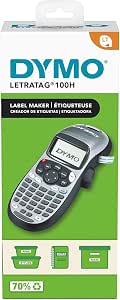 | Best for Simple Handheld Labeling | Model: LetraTag 100H | Printing technology: Thermal | Display: LCD with graphical preview | VIEW ON AMAZON | See Our Full Breakdown |
| SUPVAN E11 Keyboard & Bluetooth Label Maker Machine with 4 Tapes |  | Best for App-Assisted Design | Battery capacity: 1200 mAh | Battery life: Up to 1 month per charge | Weight: 0.5 lb | VIEW ON AMAZON | See Our Full Breakdown |
| Brother P-Touch PT-N10 Personal Handheld Label Maker |  | Best for Colorful Personal Labels | Model: PT-N10 | Tape width: 12mm (1/2 inch) | Tape length: 4m (13.1 ft) | VIEW ON AMAZON | See Our Full Breakdown |
| DYMO LetraTag 100H Plus Handheld Label Maker |  | Best for On-Device Preview | Printer type: Thermal | Output: Monochrome | Display: LCD graphical display | VIEW ON AMAZON | See Our Full Breakdown |
| Brother P-Touch PT-N20 Personal Desktop Label Maker with Btag Tapes |  | Best for Btag Customization | Model: PT-N20 | Tape width: 12mm (1/2 inch) | Tape length: 4m (13.1 ft) | VIEW ON AMAZON | See Our Full Breakdown |
| Phomemo M150 Bluetooth Label Maker |  | Best for App-Based Versatility | Model: M150 | Printer type: Thermal | Connectivity: Bluetooth and USB | VIEW ON AMAZON | See Our Full Breakdown |
More Details on Our Top Picks
DYMO LetraTag 100H Handheld Label Maker with 3 Bonus Tapes
The DYMO LetraTag 100H is a good fit for household labeling when you want a handheld keyboard and a screen to check each label before printing. Its two-line printing, date stamp, and range of font and box styles cover common jobs such as pantry containers, folders, and storage bins. The three included tape types also make it easier to choose between paper, plastic, and clear labels from the start. Compared with the Brother PT-M95, it offers more box styles and a graphical display, while the Brother bundle provides a QWERTY keyboard and four tapes. The tradeoff is that the LetraTag prints only in black and depends on specific LT cassettes, so it is less flexible for buyers who want broad tape options or phone-based design.
Pros:- Graphical display lets you preview labels before printing
- Prints up to two lines for longer household labels
- Includes paper, plastic, and clear LT tapes
- Compact handheld body and auto-off feature suit occasional use
Cons:- Prints black text only
- Requires DYMO LT tape cassettes
- Customization and layout control are limited compared with app-connected models
Best for: Households that want a compact, screen-equipped label maker for occasional pantry, storage, and folder labels.
Not ideal for: People who want color printing, app-based label design, or a wide choice of tape systems.
- Model:LetraTag 100H
- Type:Handheld label maker
- Display:Graphical
- Font sizes:5
- Print styles:7
- Box styles:8
- Printing:Two lines
- Memory:9 labels
- Included tapes:Paper black on white, plastic black on white, and plastic black on clear
Our verdict“Choose the LetraTag 100H for straightforward household labels with a preview screen and several starter tape types.”
Nelko P21 Bluetooth Label Maker Machine with Tape
The Nelko P21 is the most phone-centered option in this group: Bluetooth connects it to an iOS or supported Android device, and its app supplies templates, icons, borders, and language choices for making labels. That makes it better suited to shoppers who want to compose designs on a screen than the keyboard-based Brother PT-D210. Its 203 DPI direct thermal printing needs no ink or toner, and the rechargeable body is easy to carry between home, school, and work. The limits matter, though: it cannot print from a computer, the supplied label lengths are fixed rather than continuous, and the listed compatibility excludes Android 14 phones. I would skip it if you need reliable use across a mixed-device household or want to type and print without an app.
Pros:- Compact Bluetooth design pairs with iOS and supported Android devices
- 203 DPI thermal printing requires no ink or toner
- App offers a broad selection of templates, icons, borders, and languages
- Built-in rechargeable battery supports portable use
Cons:- Does not work with computers or Android 14 phones
- Supports fixed-length labels rather than continuous tape
- Charging adapter is not included
Best for: iOS users and owners of supported Android phones who want portable, app-designed labels for home, school, or small office tasks.
Not ideal for: Computer users, Android 14 phone owners, and anyone who needs continuous-length labels or keyboard-only operation.
- Connectivity:Bluetooth
- Compatibility:iOS and Android; not compatible with Android 14 phones or computers
- Print technology:BPA-free direct thermal
- Resolution:203 DPI
- Print color:Monochrome black text
- Battery:Built-in rechargeable
- Label sizes:Fixed lengths including 14 × 40 mm, 14 × 50 mm, and 14 × 75 mm
- App library:3,600+ icons, 700+ borders, 5,500+ materials, 750+ templates, and 29 languages
Our verdict“Pick the P21 if app-based design and portability matter more to you than computer support or continuous label lengths.”
Brother PT-M95 P-Touch Monochrome Label Maker Bundle with 4 Label Tapes
The Brother PT-M95 keeps label making self-contained: its QWERTY keyboard and easy-view display let you enter text and print without pairing a phone or navigating an app. That gives it an advantage over the Nelko P21 for buyers who prefer physical controls or do not want to check device compatibility. The bundle includes four black-on-white tapes, and the machine can print one or two lines with eight deco patterns, enough variation for basic home and home-office labeling. Compared with the DYMO LetraTag 100H, the PT-M95 includes one more tape but has fewer described style options and only two tape widths. Its monochrome output and limited widths make it a practical basic pick, not a versatile choice for custom designs or larger labels.
Pros:- QWERTY keyboard supports direct text entry without a phone
- Easy-view display helps check text before printing
- Bundle includes four black-on-white tapes
- Prints one or two lines and offers eight deco patterns
Cons:- Monochrome printing only
- Tape options are limited to 9 mm and 12 mm widths
- Less suitable for elaborate designs than app-connected models
Best for: People who want a lightweight, standalone keyboard label maker for routine home and home-office organization.
Not ideal for: Buyers who need app-designed layouts, color output, or a wider range of tape widths and label materials.
- Model:PT-M95
- Keyboard:QWERTY
- Display:Easy-view
- Tape widths:9 mm and 12 mm
- Included tapes:4 black-on-white label tapes
- Print lines:1 or 2
- Deco modes:8 patterns
- Color:White
Our verdict“Choose the PT-M95 for simple keyboard-driven labeling with several starter tapes and no phone setup.”
Brother P-Touch PT-D210 Label Maker Bundle with 4 Tapes
The Brother PT-D210 suits label makers who want more built-in design choices than the simpler PT-M95 can offer. One-touch access to 14 fonts, 98 frames, and more than 600 symbols makes it easier to distinguish household and office labels without designing them on a phone. Its preview display helps catch layout mistakes, while compatibility with four tape widths—from 3.5 mm through 12 mm—covers narrow identifiers as well as broader labels. The bundle includes four black-on-white tapes, but power takes planning: six AAA batteries are sold separately, and the optional AC adapter is not included. Compared with the app-based Nelko P21, the PT-D210 works from its own controls and supports several tape widths, though its design tools are preset rather than app-library driven.
Pros:- One-touch keys provide quick access to design tools
- Preview display helps check labels before printing
- Supports 3.5 mm, 6 mm, 9 mm, and 12 mm tapes
- Includes four black-on-white tapes
Cons:- Six AAA batteries are sold separately
- Optional AC adapter is not included
- Built-in presets offer less open-ended design than a connected app
Best for: Home and small-office organizers who want many built-in fonts, symbols, and frames with several tape-width options.
Not ideal for: Buyers who want rechargeable power, phone-based design tools, or a ready-to-use package with batteries included.
- Model:PT-D210
- Fonts:14
- Frames:98
- Symbols:600+
- Templates:27
- Compatible tape widths:3.5 mm, 6 mm, 9 mm, and 12 mm
- Power:6 AAA batteries sold separately or optional AD-24 AC adapter
- Included tapes:4 black-on-white label tapes
Our verdict“Pick the PT-D210 if you want substantial on-device customization and can supply its batteries or optional adapter.”
Nelko P21 Bluetooth Label Maker Machine with Tape
This Nelko P21 is a compact rechargeable choice for shoppers who want a small printer and are comfortable creating labels on a phone. Its BPA-free thermal system prints black text at 203 DPI without ink or toner, while the app offers a large selection of templates, icons, and borders. Against the keyboard-based Brother PT-M95, the P21 offers more app-led design options and built-in rechargeable power, but it depends on a compatible mobile device and does not support computer printing. Label lengths are fixed, so it is less flexible for long custom runs than a model that accepts continuous tape. The package includes tape, though its charging adapter is absent. I would choose it for portable, occasional labeling, provided the phone compatibility and tape format fit your workflow.
Pros:- Compact Bluetooth printer is easy to carry
- Built-in rechargeable battery avoids disposable batteries
- 203 DPI direct thermal printing uses no ink or toner
- App includes extensive templates, icons, borders, and language options
Cons:- Does not work with computers or Google Pixel phones running Android 14
- Fixed-length labels do not support continuous tape
- Charging adapter is not included and printing is monochrome
Best for: People who need a pocketable, rechargeable label printer for occasional labels designed on a compatible iOS or Android phone.
Not ideal for: Computer-based workflows, Google Pixel phones running Android 14, and buyers who need continuous tape or multiple print colors.
- Connectivity:Bluetooth
- Compatibility:iOS and Android; excludes computers and Google Pixel phones running Android 14
- Print technology:BPA-free direct thermal
- Resolution:203 DPI
- Print color:Monochrome black
- Battery:Built-in rechargeable
- Label sizes:Fixed lengths including 14 × 40 mm, 14 × 50 mm, and 14 × 75 mm
- Included accessories:Tape included; charging adapter not included
- App library:3,600+ icons, 700+ borders, 5,500+ materials, 750+ templates, and 29 languages
Our verdict“Choose this P21 version for compact, rechargeable, phone-designed labels if fixed lengths and device limits suit you.”
Brother P-Touch PTH110BP Portable Label Maker Bundle with 4 Tapes
The Brother P-Touch PTH110BP is a practical pick for someone who wants to start labeling right away: this bundle includes four laminated 12 mm TZe tapes, while the PTD220 requires buyers to source tape separately. Its QWERTY keyboard and preview display keep routine label creation simple, and the labels are designed to resist water, fading, and peeling, which suits kitchen containers and frequently handled supplies. The PTH110BP has fewer fonts and symbols than the PTD220, so it is less suited to elaborate layouts. Its 15-label memory also holds fewer saved designs than the PTD220’s 30. Power comes from AAA batteries or an optional adapter, and this bundle’s tapes are all black on white.
Pros:- Includes four laminated TZe tapes for immediate labeling
- QWERTY keyboard and preview display simplify basic label design
- Laminated tape resists water, fading, and peeling
- Runs on AAA batteries or an optional AC adapter
Cons:- AC adapter is sold separately
- Bundle includes only black-on-white tape
- Stores fewer labels than the PTD220
Best for: Home organizers who want a familiar keyboard and several durable tapes included for labeling storage, supplies, and containers.
Not ideal for: People who want broad template options, more saved labels, or colored tape choices in the box.
- Model:PTH110BP
- Supported tape widths:3.5 mm to 12 mm
- Included tapes:Four black-on-white TZe tapes: one sample and three full-length, 12 mm tapes
- Fonts:3
- Frames:14
- Symbols:Over 250
- Memory:Up to 15 labels
- Power:6 AAA batteries or AC adapter, sold separately
- Tape durability:Laminated, water-resistant, and fade-resistant
Our verdict“Choose the PTH110BP if an included supply of durable tape matters more than extensive templates or memory.”
Brother P-Touch PTD220 Home/Office Everyday Label Maker
For households or small offices that repeat and personalize many labeling jobs, the Brother P-Touch PTD220 offers more built-in design options than the PTH110BP: it has 14 fonts, 99 frames, 600+ symbols, and 25 templates. Those presets make it easier to produce a polished label without composing every layout from scratch, while memory for 30 labels helps with recurring names or storage categories. Like the PTH110BP, it uses a QWERTY keyboard and prints laminated TZe tape up to 12 mm wide. The key tradeoff is that no tape is listed as included, and both batteries and the optional adapter are separate purchases. Its narrow maximum width also rules out large-format labels.
Pros:- 25 templates speed up common label layouts
- Offers 14 fonts, 99 frames, and over 600 symbols
- Stores up to 30 labels for repeat printing
- Prints durable laminated TZe tape
Cons:- Tape is not listed among the included items
- Batteries and optional AC adapter are sold separately
- Maximum label width is about 12 mm
Best for: Home and small-office organizers who make varied labels and want templates and saved designs for repeat tasks.
Not ideal for: Buyers who want a ready-to-use bundle with tape included or need labels wider than 12 mm.
- Model:PTD220
- Maximum label width:12 mm (1/2 inch)
- Fonts:14
- Font styles:11
- Frames:99
- Symbols:600+
- Templates:25
- Memory:30 labels
- Power:6 AAA batteries or optional AC adapter
Our verdict“Pick the PTD220 if customization and saved designs matter more than having tape included in the box.”
DYMO LabelManager 160 Label Maker Bundle with 3 D1 Label Cassettes
The DYMO LabelManager 160 suits buyers who want quick text entry and editing on a handheld machine. Its QWERTY keyboard is paired with one-touch smart keys, and the listed formats and symbols give users ways to customize labels without relying on a phone app. The bundle includes three 1/2-inch D1 cassettes, which makes it more ready for ongoing use than the LetraTag 100H package with one cassette. That convenience comes with a tape-system commitment: it uses DYMO D1 tapes, rather than Brother’s TZe system in the PTH110BP. The device prints in black only, and the listed dimensions and weight make it less pocketable than its compact description might suggest.
Pros:- QWERTY keyboard and one-touch keys speed up editing
- Bundle includes three D1 label cassettes
- Automatic power-off helps conserve battery life
- Inkless thermal printing
Cons:- Monochrome printing only
- Uses DYMO D1 tapes specifically
- Listed dimensions and 1.3-pound weight make it less compact than smaller handheld options
Best for: Home and office users who prefer direct keyboard editing and want several D1 cassettes included.
Not ideal for: People seeking color printing, app-based design, or compatibility with Brother TZe and DYMO LT tape systems.
- Printer type:Thermal
- Resolution:300 × 300
- Weight:1.3 lb
- Dimensions:2.5 × 10 × 10 in
- Compatible tape:DYMO D1 label tapes
- Included tapes:Three 1/2-inch D1 label cassettes
- Text customization:Over 20 text formats and 200+ symbols
- Ink color:Black
- Special features:Portable, lightweight, auto power-off, inkless printing
Our verdict“Choose the LabelManager 160 if quick keyboard edits and included D1 cassettes suit your labeling routine.”
DYMO LetraTag 100H Handheld Label Maker with LT Label Tapes
The DYMO LetraTag 100H keeps home labeling straightforward with a graphical LCD preview and options for five font sizes, seven print styles, and eight box styles. That preview helps users check how a label will look before printing, while the LabelManager 160 adds one-touch editing and includes three cassettes instead of one. The 100H comes with a single 1/2-inch LT paper cassette, so it is a lighter commitment for occasional household tasks but offers less tape to start with than the LabelManager bundle. Its thermal printing and dedicated LT tape format keep it focused on basic labels; buyers needing broader media choices or app-driven layouts should look elsewhere. Auto-off helps conserve power between jobs.
Pros:- Graphical LCD preview shows text effects before printing
- Offers five font sizes, seven print styles, and eight box styles
- Compact handheld format weighs 14.08 ounces
- Includes one black-on-white LT paper cassette
Cons:- Only one cassette is included
- Requires DYMO LT tapes
- Thermal printing and the listed tape cassette limit media flexibility
Best for: People who want a simple handheld label maker for occasional home organization and appreciate an on-screen preview.
Not ideal for: Frequent labelers who need multiple tapes in the box, broad media choices, or advanced app customization.
- Model:LetraTag 100H
- Printing technology:Thermal
- Display:LCD with graphical preview
- Resolution:300 × 300 dpi
- Font sizes:5
- Print styles:7
- Box styles:8
- Included tape:One 1/2-inch black-on-white LT paper cassette
- Weight:14.08 oz
Our verdict“The LetraTag 100H fits occasional household labeling when a clear preview matters more than bundled tape quantity.”
SUPVAN E11 Keyboard & Bluetooth Label Maker Machine with 4 Tapes
The SUPVAN E11 bridges a physical keyboard and phone-based design: users can print a quick label directly or use Bluetooth and the app for more detailed layouts. Its listed library of 30+ fonts, 50+ frames, and 660+ icons offers more design variety than the PTH110BP’s built-in choices, and support for continuous and die-cut labels adds format flexibility. A rechargeable 1200 mAh battery is rated for up to a month per charge, while 0.2-inch margins reduce unused tape at the ends. The tradeoff is that advanced editing depends on installing the app and pairing a phone. Its compact 0.5-pound body also leaves less room for the physical keyboard than the Brother PTD220.
Pros:- Offers both direct keyboard printing and Bluetooth app design
- App lists over 30 fonts, 50+ frames, and 660+ icons
- Rechargeable battery rated for up to one month per charge
- 0.2-inch margins help reduce tape waste
Cons:- Advanced customization requires app installation and Bluetooth pairing
- Small keyboard may feel cramped
- Tape durability details are not provided in the listed specifications
Best for: Phone-comfortable home or small-office users who want app layouts, multiple label formats, and a rechargeable device.
Not ideal for: Buyers who want a roomy keyboard, prefer not to pair a phone, or need durability details beyond those listed for the tape.
- Battery capacity:1200 mAh
- Battery life:Up to 1 month per charge
- Weight:0.5 lb
- Dimensions:5.7 × 2.9 × 1.3 in
- Connectivity:Bluetooth
- Print margin:0.2 in
- Label types:Continuous and die-cut labels
- App design options:30+ fonts, 50+ frames, 660+ icons
- Languages:17
Our verdict“Choose the E11 if app-based design and low tape margins outweigh the convenience of a larger standalone keyboard.”
Brother P-Touch PT-N10 Personal Handheld Label Maker
The PT-N10 suits quick personal organizing when color and simple handheld typing matter more than tape flexibility. Its full QWERTY keyboard, small preview display, and built-in cutter make it straightforward to create labels for drawers, notebooks, or dorm supplies without a phone. Compared with the Brother PT-N20, it has fewer symbols and frames and a shorter display, so the PT-N20 gives more room to customize and preview text. The PT-N10 still offers 200 symbols and 10 frames, enough variety for everyday labels. Its main limitation is the 12mm Btag-only tape system, which restricts both width and tape choice; it also prints no more than two lines. You will need to supply six AAA batteries.
Pros:- Full QWERTY keyboard supports quick typing without a phone
- Preview display helps catch text errors before printing
- Built-in cutter gives labels clean edges
- Portable, battery-powered design works away from a desk
Cons:- Requires six AAA batteries, which are not included
- Works only with 12mm Brother P-touch Btag tapes
- Prints at most two lines per label
Best for: Students and home organizers who want a portable keyboard label maker for colorful, short labels
Not ideal for: People who need wide labels, longer text, or a choice of tape systems; it only supports 12mm Brother Btag tape
- Model:PT-N10
- Tape width:12mm (1/2 inch)
- Tape length:4m (13.1 ft)
- Power:6 AAA batteries (not included)
- Display:12-character LCD
- Keyboard:Full QWERTY
- Customization:3 fonts, 6 styles, 200 symbols, 10 frames
- Memory:Saves up to 10 labels
- Tape compatibility:Brother P-touch Btag, 17 color options
Our verdict“Choose the PT-N10 for portable, colorful everyday labels if its narrow Btag tape system fits your needs.”
DYMO LetraTag 100H Plus Handheld Label Maker
The LetraTag 100H Plus is a good fit for people who want to adjust a label on the machine and see how it will look before printing. Its graphical LCD preview shows text effects, sizes, and styles, while five font sizes and seven print styles offer more on-device formatting than the simpler Brother PT-N10. A magnetic holder also gives it a handy place to live on a filing cabinet or fridge. The tradeoff is a slower print pace of about one page per minute, which makes it less suited to labeling a large batch at once. It prints monochrome labels and performs best with authentic DYMO labels, so buyers seeking broader tape choice or faster repeat printing may prefer another model in this roundup.
Pros:- Graphical LCD previews text effects, sizes, and styles
- Five font sizes and seven print styles allow on-device customization
- Compact, lightweight body is easy to carry
- Auto-off helps conserve energy between uses
Cons:- Print speed is about one page per minute
- Monochrome output limits color-coded organizing
- Best performance calls for authentic DYMO labels
Best for: Home and small-office organizers who want to preview formatting on the device before printing occasional labels
Not ideal for: People labeling many items in one session or seeking color output; printing is slow and monochrome
- Printer type:Thermal
- Output:Monochrome
- Display:LCD graphical display
- Resolution:300 x 300
- Print speed:1 page per minute
- Customization:5 font sizes, 7 print styles, 8 box styles
- Weight:12 ounces
- Dimensions:3.31 x 12.3 x 2.6 inches
Our verdict“Pick the LetraTag 100H Plus for occasional home or office labels when clear on-device preview matters more than speed.”
Brother P-Touch PT-N20 Personal Desktop Label Maker with Btag Tapes
Within Brother’s Btag line, the PT-N20 is the more flexible choice for shaping a label before printing. Its 16-character screen, 250 symbols, and 15 frames give you more room to edit and decorate than the PT-N10, which has a shorter display and fewer design options. The built-in cutter and full QWERTY keyboard keep routine labeling simple, while the tape’s split backing is designed for damage-free removal—useful for changing labels on storage bins or dorm items. The cost of that convenience is a closed 12mm Btag tape system; unlike the Phomemo M150, it cannot print wider formats or use phone and computer connectivity. Choose this model for hands-on, compact organizing rather than app-driven or large-format label jobs.
Pros:- 16-character display gives more preview room than the PT-N10
- 250 symbols and 15 frames add variety to label designs
- Split-back Btag tape is designed for damage-free removal
- Full QWERTY keyboard and built-in cutter simplify handheld use
Cons:- Limited to 12mm Brother Btag tapes
- No Bluetooth or app connectivity is specified
- Stores only 10 labels in memory
Best for: People organizing dorms, homes, or workshops who want removable colorful labels and more on-device design choices
Not ideal for: Buyers who need multiple tape widths, app connectivity, or a label maker that works beyond Brother Btag tapes
- Model:PT-N20
- Tape width:12mm (1/2 inch)
- Tape length:4m (13.1 ft)
- Display:16-character screen
- Keyboard:Full QWERTY
- Customization:3 fonts, 7 styles, 250 symbols, 15 frames
- Memory:Saves 10 labels
- Cutter:Built-in
- Tape compatibility:Brother Btag tapes with split backing
Our verdict“Choose the PT-N20 if removable Btag labels and richer on-device customization matter more than tape flexibility or connectivity.”
Phomemo M150 Bluetooth Label Maker
The Phomemo M150 takes a different approach from handheld keyboard models: it pairs with a phone, tablet, or computer and uses an app for layout. That makes it the most flexible option here for varied label jobs, with 20–50mm print widths suited to addresses, barcodes, and broader organizing labels. Bluetooth and USB support also give it more ways to connect than the Brother PT-N20, which relies on its built-in keyboard. The thermal printing system needs no ink, and the maker claims up to 4,200 labels per charge. In exchange, setup and full functionality depend on installing the companion app, and output is monochrome. It cannot print standard 4 x 6 inch shipping labels, so it should not replace a dedicated shipping-label printer for that task.
Pros:- Bluetooth and USB connect to mobile devices and computers
- 20–50mm print width supports more label formats than the 12mm Brother Btag models
- Thermal printing requires no ink
- Portable body and stated capacity of up to 4,200 labels per charge suit frequent mobile use
Cons:- Cannot print 4 x 6 inch shipping labels
- Monochrome output does not support color-coded printing
- Full functionality requires installing the companion app
Best for: Phone- and computer-based organizers who need multiple label widths for addresses, barcodes, and household or office tasks
Not ideal for: Shippers who need 4 x 6 inch labels, or buyers who prefer a standalone keyboard and color output
- Model:M150
- Printer type:Thermal
- Connectivity:Bluetooth and USB
- Compatibility:iOS, Android, Windows, macOS, Linux
- Print width:0.78–1.96 inches (20–50mm)
- Print speed:30–50mm per second
- Battery life:Up to 4,200 labels per charge
- Weight:308g
- Output:Monochrome; no ink required
Our verdict“Pick the M150 for app-designed labels across several widths, provided monochrome printing and its app workflow suit you.”

How We Picked
I compared the 14 listed models by how well their controls fit common labeling routines: typing directly on a built-in keyboard, editing from a phone, or keeping a compact handheld nearby. I also considered tape system, included supplies, portability, likely ease of setup, and whether the product is positioned for personal, household, or office work. These factors matter because a label maker that is easy to operate but hard to restock may be a poor fit for frequent use.
The ranking favors versatility and a clear everyday workflow first, then gives distinct places to simpler, more portable, app-driven, and specialized options. Models with similar names or repeated listings are judged by their stated configuration and bundle, rather than assumed to be separate generations or upgrades. Since the lineup spans different tape families and control styles, I treat compatibility and workflow fit as stronger decision points than feature count alone.
Factors to Consider When Choosing Label Maker
Before choosing a label maker, match the machine to the way you expect to create and replace labels. These broader choices can prevent a common mismatch: buying a capable device whose controls, tape, or upkeep do not suit your actual routine.
Choose the control style you will actually use
A built-in keyboard keeps labeling self-contained: type, preview, and print without opening another device. That can make sense for quick cupboard, cable, or file labels, especially when the machine will stay in one place. Bluetooth models move editing to a phone, which can make longer text and layout adjustments easier, but they add app setup and a dependence on a compatible phone. Think about where labels are composed, not just where they are printed. If several people will share the machine, a familiar keyboard may be easier to hand around. If you already organize from a phone, app control may feel more natural.
Check tape compatibility before comparing bundles
Label makers use different tape systems, and cartridges that look similar may not fit across brands or product lines. Identify the exact tape family before buying refills, then check which widths, colors, and finishes are available for it. A starter bundle can be useful, but multiple tapes only help if their formats suit the labels you plan to make. Buyers often focus on the included count and overlook the cartridge type. Consider the ongoing task: labeling freezer containers, folders, cables, or storage bins can call for different tape properties. Confirm the machine’s supported tape range against those needs before settling on a model.
Match portability to the place you label
A compact handheld is easy to keep in a drawer or carry between rooms, but a small body can mean fewer dedicated controls or a more limited editing experience. A larger desktop-style unit can be more comfortable for repeated typing, yet it takes up space and is less convenient to move. Consider whether labels will be made in short bursts around the house or during longer sessions at a desk. Also check the power approach and whether it fits the places you plan to work. Portability matters most when it reduces friction; it adds little value if the printer will live beside your computer.
Separate occasional labeling from repeat work
For a seasonal home project, ease of setup and a useful starter tape may matter more than extensive formatting. Regular office or inventory labeling puts more weight on comfortable controls, consistent output, and convenient access to replacement supplies. Estimate how often you will print and how many labels each session might involve. A model that feels fine for a few labels can become tedious during a large organizing project. Buyers sometimes pay for app features they rarely open, or choose a basic unit that slows down repetitive work. Let the expected rhythm of use determine which conveniences are worth having.
Decide how much formatting control you need
Simple text labels do not call for the same editing options as labels that need symbols, varied layouts, or carefully arranged information. A straightforward handheld can be enough for naming bins and folders, while phone-based editing may be useful when you want to adjust longer text before printing. More control can also add steps: app permissions, connection setup, or menu navigation may interrupt a quick task. Write down a few examples of labels you expect to make, including the longest one. Then choose the lightest workflow that handles those examples comfortably. This avoids choosing by feature lists that do not reflect your real labeling jobs.
Plan for refills and storage
A label maker is useful only while compatible tape is easy for you to find and store. Before buying, check whether the needed cartridge family and widths are readily available through your preferred suppliers. Keep tape protected from heat, dust, and damage, and store the machine where it can be reached when a labeling task comes up. A bundle may reduce the need for an immediate refill, but it does not answer what replacement tapes you will use later. If you expect to maintain labels over time, consider refill availability part of the purchase decision. This is especially helpful when multiple machines or tape formats are already in your home or workplace.
Frequently Asked Questions
Should I choose a label maker with a keyboard or Bluetooth?
Choose a keyboard model if you want a self-contained machine for short labels and quick tasks. Bluetooth makes more sense if you prefer composing on a phone or want app-based editing. The tradeoff is that a phone workflow can add connection and app steps before printing. Think about who will use the machine and whether they are comfortable with that setup. The PT-D210 represents the keyboard approach in this lineup, while the Nelko P21 is a phone-first option.
Can I use one brand’s tape in another brand’s label maker?
Usually, you should assume that tape is specific to its machine or product family unless compatibility is stated clearly. The models here include Brother P-Touch, DYMO LetraTag, DYMO D1, and Btag systems, so the brand name alone does not establish a match. Check the exact tape family and supported widths before purchasing refills. If you already own compatible cartridges, use that as a practical filter when choosing another device. This can prevent a bundle from leaving you with supplies that do not fit your existing printer.
Is a multi-tape bundle worth choosing?
A bundle is useful when its included tape types fit the labels you need to make, since it lets you start without sourcing a refill immediately. It is less useful if the tape width, color, or format does not suit your projects. Check the cartridge family first, then compare the included tapes with likely uses such as files, containers, or cables. Also consider whether you can readily get the same tape later. A larger bundle is not automatically the better fit if it includes supplies you will not use.
What should I prioritize for occasional home organization?
For occasional use, prioritize a simple setup, controls you understand, and a tape format suited to household labels. A compact handheld can be easier to store than a larger desktop model, while an app-based unit may be appealing if you already compose lists and layouts on your phone. You probably do not need the broadest editing workflow for a handful of bins or pantry containers. Still, check refills before buying so the machine remains useful after its starter tape runs out. The best fit is the one you will reach for when a small task appears.
When does it make sense to choose a phone-based label maker?
A phone-based model makes sense when you prefer editing on a touchscreen or want to prepare label layouts in an app. It can be a comfortable choice for people who already use their phone for organizing tasks. The added dependence on app support and a working connection is the main tradeoff, particularly if other household members will share the printer. Check the app workflow and tape compatibility before deciding. If you want a device that can print without phone setup, a built-in keyboard model is the simpler path.
Conclusion
For most buyers, I recommend the Brother P-Touch PT-D210 as the best overall because its standalone keyboard workflow is a practical middle ground. The best value depends on the bundle and tape format that suits your routine; compare the included supplies before choosing among the entry-oriented handhelds. For a best premium-style workflow, consider the phone-driven Nelko P21 or Phomemo M150 if app editing is a priority. Beginners who want a straightforward handheld can start with the DYMO LetraTag 100H. For repeat home or office use, look at the PTD220; for a portable Brother option, compare the PTH110BP, and for phone-first labeling, weigh the SUPVAN E11 alongside the Bluetooth picks. Match the tape family to your refill plans, and the right choice should become clear.
Fall Picks
fall essentials
As an affiliate, we earn on qualifying purchases.