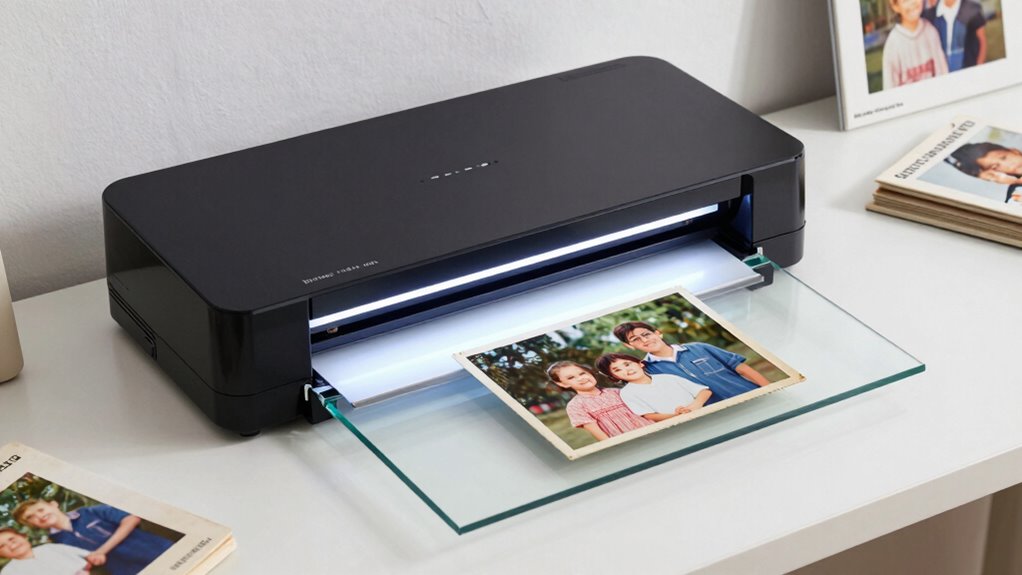

A flatbed photo scanner for family photo digitization needs to balance three things most buyers don’t realize are in tension: scan quality, speed, and ease of use. The Epson Perfection V39 II is my top overall pick because it delivers high-resolution flatbed scans of loose prints at a price most families can justify for a one-time digitization project. If your collection is measured in the thousands rather than the dozens, the Epson FastFoto FF-680W changes the math entirely — it feeds photos through automatically instead of requiring one-at-a-time flatbed placement. Budget-conscious buyers should look at the Canon CanoScan LiDE 300, which trades some speed for solid image quality. Read on for the full breakdown, including where the bigger A3-capable VIISAN models fit and which picks I’d skip for photo work.

Prime made for students and young adults
- Fast, free delivery for dorm and study essentials
- Prime Video and Amazon Music included
- Member-only deals
Key Takeaways
- The Epson Perfection V39 II and V19 II topped the rankings for pure photo quality, but their one-photo-at-a-time flatbed design makes them best for small or precious collections rather than bulk digitization.
- The Epson FastFoto FF-680W is the only pick that handles large archives efficiently — its sheet-fed design scans a photo per second, though it cannot scan framed prints, album pages, or delicate originals the flatbeds can.
- The Canon CanoScan LiDE 300 and LiDE 400 are the value leaders; the LiDE 400’s extra speed only matters if you’ll scan regularly, not for a one-time project.
- The VIISAN 3120 and VF3240 earn their spots only when you need A3-size coverage for oversized prints or scrapbook pages — for standard 4×6 photos, they cost more without improving image quality.
- The ClearClick InstaScan and Plustek ePhoto Z300 are beginner-friendly feeders, but their fixed focus and lower optics mean noticeably softer scans than the flatbed picks — fine for sharing online, weaker for archival copies.
| Epson Perfection V19 II Flatbed Photo Scanner |  | Best Overall Flatbed for Family Photo Digitization | Scanner type: Flatbed | Optical resolution: 4800 dpi | Scan speed: As fast as 10 seconds for letter-size at 300 dpi | VIEW ON AMAZON | See Our Full Breakdown |
| ClearClick InstaScan Photo Scanner for PC and Mac |  | Best for Beginners with Small Photo Collections | Scanner type: Photo and receipt | Connection: USB-C | Resolution: 300 dpi | VIEW ON AMAZON | See Our Full Breakdown |
| VIISAN 3120 A3 Flatbed Scanner, 1200 DPI |  | Best for Oversized Prints and Albums | Scanner type: A3 flatbed | Sensor: CIS | Max optical resolution: 1200 x 1200 dpi | VIEW ON AMAZON | See Our Full Breakdown |
| Canon CanoScan LiDE 300 Scanner |  | Best Budget-Friendly Starter Flatbed | Scanner type: Flatbed document and photo | Connectivity: USB | Scan mode: Auto Scan Mode | VIEW ON AMAZON | See Our Full Breakdown |
| AMBIR Photo Scanner with Photo Cleaning Kit Bundle |  | Best Bundle for Preserving Fragile Prints | Scanner type: Photo | Connection: USB | Resolution: 300/600 dpi | VIEW ON AMAZON | See Our Full Breakdown |
| VIISAN VF3240 A3 Flatbed Scanner |  | Best for Oversized and Large-Format Projects | Maximum optical resolution: 2400 × 2400 DPI | Maximum color depth: 48-bit | Scan area: Up to 12 × 17 inches | VIEW ON AMAZON | See Our Full Breakdown |
| Canon CanoScan LiDE 400 Slim Document and Photo Scanner, Black |  | Best Slim All-Rounder | Resolution: 4800 × 4800 dpi | Scan speed: As fast as 8 seconds | Connection and power: USB Type-C, single cable | VIEW ON AMAZON | See Our Full Breakdown |
| Epson FastFoto FF-680W High-Speed Duplex Photo and Document Scanner |  | Best for High-Volume Photo Backlogs | Photo scan speed: Up to 1 photo per second at 300 dpi | Photo batch capacity: Up to 36 photos | Maximum photo size: 8 × 10 inches | VIEW ON AMAZON | See Our Full Breakdown |
| Epson Perfection V39 II Flatbed Photo Scanner |  | Best Budget Flatbed for Restored Prints | Type: Flatbed photo and document scanner | Optical resolution: 4800 dpi | Power: USB-powered | VIEW ON AMAZON | See Our Full Breakdown |
| flatbed photo scanner for family photo digitization | Scanner type |
|---|---|
| Epson Perfection V19 II Flatbe | Flatbed |
| ClearClick InstaScan Photo Sca | Photo and receipt |
| VIISAN 3120 A3 Flatbed Scanner | A3 flatbed |
| Canon CanoScan LiDE 300 Scanne | Flatbed document and photo |
| AMBIR Photo Scanner with Photo | Photo |
| VIISAN VF3240 A3 Flatbed Scann | — |
| Canon CanoScan LiDE 400 Slim D | — |
| Epson FastFoto FF-680W High-Sp | — |
| Epson Perfection V39 II Flatbe | — |
More Details on Our Top Picks
Epson Perfection V19 II Flatbed Photo Scanner
This option stands out for balancing true flatbed versatility with serious resolution — the 4800 dpi optical sensor captures enough detail for archival reprints and heavy cropping of old family prints. The removable lid is what separates it from sheet-fed rivals like the Epson FastFoto FF-680W: you can lay a fragile photo album or bound book flat on the glass instead of pulling prints out of sleeves. USB power keeps the desk setup to a single cable, and one-touch scanning plus Easy Photo Fix helps restore faded colors without a steep learning curve. The tradeoff is speed — a 10-second letter scan only applies at 300 dpi, and high-resolution runs take considerably longer, so a shoebox of hundreds of prints becomes a multi-week project.
Pros:- 4800 dpi optical resolution is enough for archival reprints and cropping
- Removable lid handles albums and books without removing prints from sleeves
- USB powered with a built-in kickstand for vertical storage
- One-touch scanning and Easy Photo Fix software simplify faded-photo restoration
Cons:- High-resolution scans are slow, making large collections a long project
- Some software features require an internet-connected computer
Best for: Families digitizing a mix of loose prints, albums, and documents who want archival-grade resolution without a bulky workstation
Not ideal for: Anyone facing thousands of loose prints — a high-speed sheet-fed scanner like the Epson FastFoto will finish the job far sooner
- Scanner type:Flatbed
- Optical resolution:4800 dpi
- Scan speed:As fast as 10 seconds for letter-size at 300 dpi
- Power:USB powered
- Software:Epson ScanSmart
- Weight:3.1 lb
- Features:One-touch scanning, OCR, removable lid, built-in kickstand
Our verdict“The most well-rounded flatbed here for families who value image quality and album-friendly design over raw throughput.”
ClearClick InstaScan Photo Scanner for PC and Mac
Where the Epson Perfection V19 II rewards patience with fine detail, the ClearClick InstaScan makes a different bet: near-instant 300 dpi scans of standard 4×6 and 5×7 prints with zero setup friction. There are no drivers to install — plug in USB-C and it works, which makes this pick the most approachable option for a grandparent or anyone intimidated by scanner software. The included cropping and adjustment software covers the basics, and the two-year warranty beats most rivals here. The compromises are real, though: with no autofeeder you feed every photo by hand, it can’t handle 8x10s or letter documents, and it ignores smartphones and Chromebooks entirely. Compared with the Plustek ePhoto Z300, the workflow is similar, but the format ceiling and platform limits are stricter.
Pros:- Near-instant scans of standard photo sizes
- Driver-free USB-C setup works out of the box
- Bundled software handles cropping and image adjustments
- Two-year warranty and included USB-A adapter
Cons:- No autofeeder — every print is fed manually
- Cannot scan 8×10 photos or letter-size documents
- No compatibility with smartphones, tablets, or Chromebooks
Best for: Casual users with a modest stack of 4×6 and 5×7 prints who want the simplest possible plug-and-scan workflow on Windows or Mac
Not ideal for: Owners of larger prints, documents, or anyone using a tablet or Chromebook as their primary computer
- Scanner type:Photo and receipt
- Connection:USB-C
- Resolution:300 dpi
- Supported media:4×6 and 5×7 photos or smaller
- Dimensions:8 x 8 x 8.5 inches
- Weight:3 lb
- Compatibility:Windows 10+; Mac OS X 11.0+
- Warranty:2 years
Our verdict“A low-hassle entry point for small collections, as long as your prints are 5×7 or smaller and your computer runs Windows or Mac.”
VIISAN 3120 A3 Flatbed Scanner, 1200 DPI
Most flatbeds here cap out at letter size, which is a problem if your family archive includes old 8×10 studio portraits, certificates, or full album pages. The VIISAN 3120 covers a full A3 glass bed, letting you capture an entire album spread in one pass instead of stitching scans together. The auto-scan-on-lid-close feature reduces clicks when batch-working, and the LED light source starts instantly. Compared with the Epson Perfection V19 II, you trade peak resolution — 1200 dpi versus 4800 — for sheer surface area; small prints will still look good on screen, but tight crops and reprints lose some headroom. The CIS sensor also demands flat originals, so anything textured or three-dimensional won’t render well. Note that WIA-mode scans are capped at 600 dpi, so use the full driver for best results.
Pros:- A3 bed captures album spreads and oversized prints in one pass
- Automatic scanning when the lid closes speeds up batch work
- LED light source needs no warm-up
- Works across recent Windows and macOS versions
Cons:- CIS sensor renders flat items only — no textured or 3D objects
- WIA scanning is limited to 600 dpi, requiring the full driver for peak quality
Best for: Families with oversized prints, certificates, or bound albums who need a large scan bed in a single pass
Not ideal for: Detail-obsessed archivists wanting maximum enlargement headroom from small prints — the 1200 dpi ceiling limits cropping
- Scanner type:A3 flatbed
- Sensor:CIS
- Max optical resolution:1200 x 1200 dpi
- Max scan size:304 x 426 mm (11.98 x 16.8 in)
- Scan speed:8 seconds for A3 color at 200 dpi
- Color depth:48-bit
- Compatibility:Windows 7/8.1/10/11; macOS 10.15+
- Warranty:1-year limited
Our verdict“The pick when your archive is defined by size rather than fine detail — nothing else in this lineup matches its single-pass coverage.”
Canon CanoScan LiDE 300 Scanner
The LiDE 300 is the straightforward, low-cost way into flatbed scanning, and its Auto Scan Mode is the headline convenience: it detects whether you’ve placed a photo or document and picks settings for you, which removes the biggest source of confusion for first-time digitizers. USB connectivity means one cable handles power and data, mirroring the convenience of the Epson Perfection V19 II but at a more accessible level. The honest tradeoff against both the V19 II and the step-up Canon CanoScan LiDE 400 is speed and refinement — this is the slower, more basic sibling, and photo-restoration tooling is thinner than Epson’s. For a household that just wants prints safely backed up at reasonable quality rather than meticulously restored, those limits are acceptable; serious archivists will want more.
Pros:- Auto Scan Mode detects photo versus document automatically
- Single USB cable handles both power and data
- Handles both documents and photos in one device
- Low-cost entry into flatbed scanning
Cons:- Slower and more basic than the LiDE 400 and Epson’s V-series rivals
- Limited photo-restoration and editing software compared with Epson ScanSmart
Best for: Budget-conscious households starting a first digitization project who want automatic settings and simple USB operation
Not ideal for: Anyone prioritizing fast batch throughput or advanced photo restoration — higher-tier models cover both better
- Scanner type:Flatbed document and photo
- Connectivity:USB
- Scan mode:Auto Scan Mode
- Media support:Documents and photos
- Power:USB bus powered
Our verdict“A sensible, no-frills starting point that gets prints off the shelf and onto a hard drive without complexity or a big spend.”
AMBIR Photo Scanner with Photo Cleaning Kit Bundle
What makes this AMBIR package distinct is what comes with the scanner: a photo cleaning kit for gently preparing delicate or aged prints before they touch the glass. Anyone who has scanned a grandparent’s dusty, fingerprinted collection knows that cleaning first visibly improves results, and no other pick in this roundup bundles those supplies. Scanning itself is quick — auto-crop and deskew straighten each print automatically, and 600 dpi mode gives smaller photos genuine enlargement headroom, putting it ahead of the 300-dpi-only ClearClick InstaScan in archival flexibility. The 8.62-ounce body is exceptionally light, which helps portability but hints at a less robust build than the flatbeds. And unlike a true flatbed such as the VIISAN 3120, it won’t handle albums or oversized originals — this is a loose-print machine.
Pros:- Bundled cleaning kit protects and prepares fragile prints before scanning
- Auto-crop and deskew straighten each photo without manual editing
- 600 dpi mode provides archival-quality capture of smaller prints
- Featherweight 8.62-ounce body is highly portable
Cons:- Not a true flatbed — albums and oversized originals are off the table
- Ultralight build feels less durable than glass-bed rivals
Best for: Careful archivists working with delicate, older prints who want cleaning supplies and 600 dpi capture in one package
Not ideal for: Anyone with bound albums, large prints, or three-dimensional originals — this handles loose photos only
- Scanner type:Photo
- Connection:USB
- Resolution:300/600 dpi
- Greyscale depth:24 bits
- Weight:8.62 oz
- Compatibility:Mac & PC
- Warranty:2-year manufacturer warranty
- Features:Auto-crop, deskew, bundled cleaning kit
Our verdict“A thoughtful choice for tender, loose family prints, pairing gentle print care with flexible 300/600 dpi capture.”
VIISAN VF3240 A3 Flatbed Scanner
When the family archive includes more than snapshots — old certificates, newspaper clippings, large portrait albums, or genealogy charts — an 8.5×11 glass bed simply isn’t big enough. The VIISAN VF3240 covers 12 × 17 inches, letting you capture full album pages or 11×14 portraits in a single pass instead of stitching multiple scans together. Compared with the Canon CanoScan LiDE 400, this model prioritizes scan area over desk footprint and convenience — it needs AC power and dedicated space, while the Canon runs off a single USB cable. The automatic scan function, which triggers when the lid closes, keeps large-batch sessions moving. Just know the fine print: the headline 2400 dpi drops to 1200 dpi for A3 scans in ViiScan software and 600 dpi via the WIA driver, so read the limits before committing.
Pros:- 12 × 17 inch scan bed captures album pages and large documents edge to edge
- Automatic scan starts the moment the lid closes, streamlining repetitive jobs
- 2400 × 2400 dpi optical resolution with 48-bit color depth
- Supports both Windows (TWAIN/WIA) and macOS (ICA)
Cons:- Top resolution is restricted in practice — 1200 dpi for A3 via ViiScan software and 600 dpi through the WIA driver
- CIS sensor demands flat originals and won’t capture 3D objects or very textured items well
- AC-powered and physically large, unlike USB-powered slim flatbeds
Best for: Archivists and genealogy hobbyists scanning album pages, certificates, blueprints, or large portraits
Not ideal for: Anyone with a small desk or mostly 4×6 snapshots — it’s oversized hardware for a job the Canon LiDE 400 handles more elegantly
- Maximum optical resolution:2400 × 2400 DPI
- Maximum color depth:48-bit
- Scan area:Up to 12 × 17 inches
- A3 color scan speed:4 seconds at 200 DPI under specific conditions
- Sensor:CIS
- Compatibility:Windows 7/8.1/10/11 (TWAIN/WIA); macOS 10.15+ (ICA)
- Power input:AC 100–240V
- Warranty:1-year limited
Our verdict“Buy this only if your collection genuinely exceeds letter size; for standard prints, a compact flatbed is the smarter fit.”
Canon CanoScan LiDE 400 Slim Document and Photo Scanner, Black
The LiDE 400 earns its spot by solving two problems at once: it delivers 4800 × 4800 dpi scans for detailed photo work, and it does so in a body just 0.4 inches thick that draws power entirely from a single USB Type-C cable. No wall adapter, no cable clutter — a real advantage if the scanner needs to travel between a home office and a relative’s house for digitizing sessions. Compared with the Plustek ePhoto Z300, it’s slower per photo but dramatically more versatile: fragile, curled, or oddly sized originals sit safely under the lid rather than feeding through rollers. The EZ buttons and auto scan mode reduce the software fiddling that derails many digitizing projects, and color restoration plus dust removal clean up aging prints automatically. The tradeoff is patience — traditional flatbed pace means big collections take real time.
Pros:- 4800 × 4800 dpi resolution captures fine detail in prints and enlargements
- Single USB Type-C cable handles both data and power
- Auto scan mode and EZ buttons simplify repetitive photo sessions
- Color restoration and dust removal tools built in
Cons:- Flatbed pace of roughly 8 seconds per scan adds up on large collections
- No automatic document feeder means every print is placed by hand
- Letter-size bed limits you to one or two small photos per pass
Best for: Home users who want a mix of photo restoration quality and document scanning in a desk-or-shelf-friendly design
Not ideal for: Anyone racing through thousands of loose prints — a sheetfed model like the Epson FastFoto FF-680W will finish the job in a fraction of the time
- Resolution:4800 × 4800 dpi
- Scan speed:As fast as 8 seconds
- Connection and power:USB Type-C, single cable
- Dimensions:7.7 × 14.5 × 0.4 inches
- Supported paper sizes:8.27 × 11.69 in; 8.50 × 11.69 in
- Features:Auto scan mode, EZ buttons, multi-page PDF, color restoration, dust removal
Our verdict“This model suits buyers who value flexibility and print quality over raw speed and want a scanner that can live on a shelf between projects.”
Epson FastFoto FF-680W High-Speed Duplex Photo and Document Scanner
If the goal is emptying decades of shoeboxes, nothing else in this lineup competes on throughput. The FF-680W scans up to one photo per second at 300 dpi and accepts batches of 36 prints, turning a 500-photo weekend marathon into an afternoon. It outpaces the Plustek ePhoto Z300 by removing the one-at-a-time tedium entirely, and its duplex scanning is quietly brilliant for family archives: handwritten dates and notes on photo backs get captured in the same pass, preserving context that single-sided scanners lose. Restoration tools handle fading and red-eye automatically, and Wi-Fi plus USB connectivity frees it from sitting next to the computer. The fine print: mobile and cloud features depend on compatible devices, accounts, and internet access, and scan speed varies with the host computer — a slow laptop can bottleneck the pipeline.
Pros:- Up to one photo per second at 300 dpi with 36-photo batch feeding
- Duplex scanning captures notes and dates written on photo backs
- Automatic restoration including color correction and red-eye reduction
- Both USB and Wi-Fi connectivity with cloud backup options and OCR document software
Cons:- Mobile app and cloud features require compatible devices, accounts, and internet access
- Actual scan performance can be limited by the connected computer
- Sheetfed design is rougher on fragile or damaged prints than a flatbed
Best for: Families digitizing hundreds or thousands of mixed-size loose photos who also want handwritten back-of-photo notes preserved
Not ideal for: Buyers with delicate, torn, or taped heirloom prints — a gentle flatbed like the Canon LiDE 400 is safer for fragile originals
- Photo scan speed:Up to 1 photo per second at 300 dpi
- Photo batch capacity:Up to 36 photos
- Maximum photo size:8 × 10 inches
- Photo scan resolutions:300 dpi, 600 dpi, and 1200 dpi interpolated
- Document scan speed:Up to 45 ppm / 90 ipm
- Maximum document length:240 inches
- Connectivity:USB and Wi-Fi
- Included accessories:Carrier sheet and microfiber cloth
Our verdict“For sheer volume with restoration built in, this is the machine for serious family archivists with sturdy prints to process.”
Epson Perfection V39 II Flatbed Photo Scanner
The V39 II is the straightforward answer for someone who wants a classic flatbed without paying for features they’ll never touch. It delivers 4800 dpi optical resolution — matching the more premium Canon CanoScan LiDE 400 on paper — plus Easy Photo Fix color restoration that revives faded prints with one click. Being USB-powered and compact, it sets up anywhere a laptop goes, and the high-rise removable lid makes scanning thick photo albums or bound books possible, something the sheetfed Epson FastFoto FF-680W simply cannot do. Compared with the Plustek ePhoto Z300, it’s slower per print but far gentler on originals and far sharper when you want enlargements or crops. The compromises are workflow-related: one-touch buttons help, but every photo is still placed by hand, and there’s no document feeder or wireless option.
Pros:- 4800 dpi optical resolution for detailed scans and enlargements
- Easy Photo Fix restores faded colors automatically
- Removable high-rise lid accommodates thick albums and books
- Compact, USB-powered design needs no wall outlet
Cons:- One photo at a time with no batch or feeder capability
- No wireless connectivity — tethered USB operation only
- Slower than sheetfed rivals for large collections
Best for: Budget-conscious families restoring faded prints and scanning bound albums page by page
Not ideal for: Anyone facing a four-digit photo backlog — hand-placing each print makes the FastFoto FF-680W the better tool for scale
- Type:Flatbed photo and document scanner
- Optical resolution:4800 dpi
- Power:USB-powered
- Scanning time:Letter-sized documents in as quickly as 10 seconds
- Software:Epson ScanSmart
- Photo restoration:Easy Photo Fix
- Lid:High-rise, removable
Our verdict“This option stands out as the affordable flatbed choice for careful, quality-focused restoration work rather than mass digitizing.”

How We Picked
I ranked these scanners against what actually matters when digitizing a family photo collection: optical resolution and color depth (which determine whether faded prints and fine detail survive the transfer), throughput for realistic batch sizes, software usability for photo restoration, and gentleness with fragile originals. A scanner that produces beautiful files but takes two minutes per photo fails a family with three shoeboxes to get through; a fast feeder that can’t handle a curling 1970s print fails the archival half of the job. I also weighed desk footprint and power source, since many people set these up temporarily on a kitchen table.
The ranking order reflects a simple question: which scanner best serves the typical family digitization project of a few hundred to a few thousand loose prints plus some oddball originals? Flatbeds with strong optics and restoration software rose to the top, dedicated feeders earned mid-tier spots for volume work, and the A3 models placed where their size advantage justifies their price for specific collections. Every pick was penalized for weaknesses a real buyer would hit — bundled software quirks, slow warm-up, or formats it simply can’t handle.
| flatbed photo scanner for family photo digitization | Scanner type |
|---|---|
| Epson Perfection V19 II Flatbe | Flatbed |
| ClearClick InstaScan Photo Sca | Photo and receipt |
| VIISAN 3120 A3 Flatbed Scanner | A3 flatbed |
| Canon CanoScan LiDE 300 Scanne | Flatbed document and photo |
| AMBIR Photo Scanner with Photo | Photo |
| VIISAN VF3240 A3 Flatbed Scann | — |
| Canon CanoScan LiDE 400 Slim D | — |
| Epson FastFoto FF-680W High-Sp | — |
| Epson Perfection V39 II Flatbe | — |
Factors to Consider When Choosing Flatbed Photo Scanner For Family Photo Digitization
Before picking a specific model, it helps to understand the tradeoffs that shape this entire category. Most buyers overestimate the resolution they need and underestimate how much time digitization actually takes — the sections below explain how to avoid both mistakes.Optical Resolution: Why 600 DPI Is Usually Enough
The most common mistake in this category is paying for resolution you’ll never use. A standard 4×6 print scanned at 600 DPI optical resolution already captures nearly everything the print contains, and reprinting at original size needs only 300 DPI. Scanners offering 4800 or 6400 DPI matter mainly for 35mm negatives and slides, where the original is tiny and needs heavy magnification — but most flatbeds under $200 lack the film holders and backlight to do that well anyway. Be especially wary of interpolated resolution numbers, which are software upscaling dressed up as a spec. Where resolution does genuinely help is cropping and enlarging: if you plan to print a cropped section of an old photo as an 8×10, higher optical resolution gives you room to do that without pixelation. For straightforward archival copies of prints, spend your budget on optics and software rather than a bigger DPI number on the box.
Flatbed Versus Sheet-Feeder: The Decision That Shapes Everything
This is the single biggest fork in the road, and many buyers don’t realize they’re choosing. A flatbed scanner handles anything you can lay on the glass: torn photos, textured prints, album pages you don’t want to dismantle, framed pictures, even documents and keepsakes. The cost is speed — you lift the lid, place one item, scan, and repeat, which can mean a full weekend for a few hundred photos. A sheet-fed scanner like the FastFoto or the feed-style picks pulls photos through in seconds each, but it requires loose, flexible, unframed prints in reasonable condition. Curled, stiff, or torn originals can jam or tear further. The honest answer for most families is a hybrid approach: use a feeder for the bulk of standard prints and a flatbed for the problem items. If you can only buy one, the deciding factor is your collection’s condition — pristine loose prints favor a feeder, mixed and fragile originals favor a flatbed.
Restoration Software: The Hidden Differentiator
Old family photos rarely need just scanning — they need fading correction, dust removal, and color rebalancing. The software that ships with your scanner often matters more than the hardware differences between models. Epson’s restoration tools and Canon’s equivalent features can automatically revive a yellowed 1970s print in a way that would take ten minutes of manual editing otherwise. Feed-style scanners from ClearClick and Plustek bundle simpler software that rotates and crops automatically but does less corrective work, which is why their output looks flatter compared with the flatbed picks even when the hardware is competent. Before buying, check whether the included software runs on your operating system version — several vendors still ship discs and outdated utilities that struggle on newer machines. Also consider whether you want to correct during scanning or afterward in a photo editor; batch auto-correction during scanning saves enormous time on large projects, but manual correction in software like Photoshop or Lightroom gives better results on badly damaged originals.
Speed, Real Throughput, and Project Math
Manufacturer speed claims measure the scan itself, not your real per-photo time. On a flatbed, the lid-lift-place-scan cycle typically runs 30 to 60 seconds per photo regardless of how fast the sensor moves — meaning 300 photos is a three-to-five-hour project even on a quick scanner. Feed scanners genuinely deliver a photo per second or two, turning that same 300-photo job into under 20 minutes. Do this math before buying: estimate your collection size, multiply by realistic per-photo time, and be honest about whether you’ll actually finish. This is why I recommend against overbuying hardware for tiny collections — if you have 50 cherished photos, any flatbed here finishes the job in an afternoon, and speed features are wasted money. Conversely, if you’ve inherited thousands of prints, a slow flatbed all but guarantees an abandoned half-finished project, which is the most expensive outcome of all.
Size, Power, and Where You’ll Actually Use It
Digitization projects tend to happen in temporary setups — a dining table cleared for a weekend — so portability and power design matter more than buyers expect. The Canon LiDE models and Epson V19 II draw power over USB, eliminating a wall adapter and making them genuinely easy to move and store between sessions. Traditional flatbeds and the A3-capable VIISAN units need separate power bricks and considerably more desk depth, and the A3 models in particular demand a permanent-ish footprint. If your scanner will live in a closet between holiday scanning sessions, a slim USB-powered unit that slides into a shelf beats a technically superior machine you dread setting up. Also check lid design: a lid that lifts flat or detaches entirely makes scanning album pages and thick originals far less frustrating than a hinged lid with limited clearance.
Scanning Negatives, Slides, and the Oddballs
Many families discover mid-project that half the collection exists as negatives and slides in carousels and sleeves — formats most print-focused scanners handle poorly or not at all. Scanning film properly requires a backlight in the lid and film holders, and budget flatbeds either omit these or include them as barely usable accessories. The Epson Perfection V39 II and V19 II accept third-party film scanning arrangements, which is part of why they rank highly for mixed collections. Feed-style scanners cannot scan film, period. Beyond film, think about odd sizes: oversized portraits, Polaroids, and scrapbook pages are where the A3 VIISAN models justify themselves — nothing smaller can capture an 11×14 print in a single pass. My advice is to inventory your collection before buying, not after. The families who end up happiest are the ones who knew whether they had film, oversized prints, or fragile albums before they clicked purchase.
Frequently Asked Questions
Should I get a flatbed scanner or a sheet-fed one like the Epson FastFoto for my family photos?
It depends entirely on the condition and volume of your collection. A sheet-fed scanner wins for large boxes of standard loose prints — being able to feed photos continuously turns a weekend project into an afternoon. A flatbed scanner wins for anything delicate, curled, torn, framed, or bound in albums, since the feeder can jam on or damage those items. The FastFoto also cannot scan negatives or odd shapes. If your collection is a few hundred mostly-standard prints, go feeder; if it’s a mix of sizes, conditions, and keepsakes, go flatbed. Some families with big mixed collections genuinely benefit from owning both, using the feeder for volume and the flatbed for problem items.
What DPI should I scan family photos at for long-term archival?
For standard prints, 600 DPI is the sweet spot — it captures essentially all the detail the print physically contains and leaves headroom for cropping or modest enlargement. Scanning at 1200 DPI or higher quadruples file size without adding real detail from a print, so it mostly fills your hard drive faster. The exception is small originals: wallet-size photos, Polaroids, and especially negatives benefit from higher resolutions because any future enlargement magnifies the original’s grain. Also scan in color even for black-and-white photos, since aged prints carry tinting that you may want to preserve or correct later. And always save an unedited master file before applying any restoration, so you can redo corrections as software improves over the years.
Do I need an A3 scanner like the VIISAN models for family photos?
Only if your collection includes oversized originals. A standard letter/A4 flatbed handles prints up to about 8.5 x 11.7 inches, which covers 4x6s, 5x7s, and 8x10s — the vast majority of family collections. You need an A3 scanner if you have formal portraits, framed photos, certificates, or scrapbook pages larger than that, because stitching multiple scans together is tedious and produces visible seams if the originals aren’t perfectly flat. The tradeoff is real: A3 units cost more, take up dramatically more desk space, and don’t produce better image quality on standard-size photos than a good letter-size flatbed. Audit your collection first — if you find only two or three oversized items, it may be cheaper to have those professionally scanned and buy a smaller scanner for the rest.
Can these scanners fix faded and damaged old photos automatically?
Partially, and it’s worth setting expectations before you start. The restoration software bundled with Epson and Canon scanners does a respectable job on common age problems — faded color casts, yellowing, and light dust — applying corrections in bulk during scanning, which saves hours on a large project. It cannot reconstruct torn corners, remove heavy scratches embedded in the print emulsion, or recover detail that was never captured in the original. Deeply damaged photos need manual editing in software like Photoshop, or professional restoration services for anything truly precious. A practical workflow is to batch-scan with auto-restoration, then flag the failures for manual attention — this gets you a complete digital archive quickly while reserving effort for the photos that need it.
What’s the best way to organize and back up photos once they’re scanned?
Decide on a file naming and folder scheme before you start scanning, because renaming thousands of files afterward is miserable. A simple structure of folders by year or family branch, with dates and names in filenames, will make the archive usable for decades. Save masters as TIFF or high-quality JPEG, and keep at least one copy off your main computer — an external drive plus a cloud service protects against the single hard-drive failure that has destroyed more family archives than fire. Involve older relatives while scanning, too: the stories behind the photos are often lost faster than the images themselves, and capturing names and dates at scan time is far easier than reconstructing them later. Finally, avoid proprietary software catalogs as your only organization system, since formats come and go while plain folders and standard image files remain readable.
Conclusion
The right pick comes down to what your collection looks like. For the best overall balance of photo quality, restoration software, and price, the Epson Perfection V39 II is the pick I’d point most families toward, with the V19 II as a near-identical alternative if you find it cheaper. For best value, the Canon CanoScan LiDE 300 covers the essentials for a one-time project without paying for speed you won’t use. For best premium — meaning large collections where time is the enemy — the Epson FastFoto FF-680W is worth every extra dollar, provided your prints are loose and in decent condition. Beginners who want the simplest possible experience will appreciate the Plustek ePhoto Z300 or ClearClick InstaScan, accepting softer scans in exchange for zero learning curve. And for specific needs: oversized prints and album pages call for the VIISAN VF3240, the LiDE 400 suits regular ongoing scanning, and the AMBIR bundle makes sense if you want cleaning supplies included from day one. Whatever you choose, start with a small test batch, lock in your file settings, and then commit — the best scanner is the one that gets your family’s photos off the shelf and into a format your grandchildren can actually open.
Fall Picks
fall essentials
As an affiliate, we earn on qualifying purchases.