Programmable STEM robotics kits range from simple app-controlled builds to genuine Arduino projects, and the biggest mistake buyers make is confusing remote-control toys with kits that actually teach coding. The Makeblock mBot earns my best overall pick for its polished block-based coding platform and classroom-proven durability, while the ELEGOO UNO R3 Smart Robot Car Kit V4 delivers the most authentic programming experience for older kids ready for real Arduino code. On the younger end, the Thames & Kosmos Coding Chameleon introduces programming logic without needing a smartphone at all. The core tradeoff in this category is ease of use versus long-term learning value — kits that snap together quickly often cap out fast, while true STEM kits demand patience and adult help. Read on for the full breakdown of all 14 kits and which one fits your child’s age, patience level, and coding goals.

Prime made for students and young adults
- Fast, free delivery for dorm and study essentials
- Prime Video and Amazon Music included
- Member-only deals
Key Takeaways
- Only about half the kits in this roundup involve real programming — several ‘programmable’ kits are mostly remote-control builds with light app features, so checking the coding interface matters more than the piece count.
- Arduino-based kits (ELEGOO UNO R3 V4, ELEGOO Conqueror, ACEBOTT QD106) teach transferable C++ skills but consistently require adult supervision for kids under 12, while Makeblock‘s mBot offers the smoothest bridge from blocks to code.
- Multi-model kits like the Sillbird 12-in-1 and Kyanio 3-in-1 win on replay value but sacrifice depth — each robot takes minutes to finish, whereas single-build kits like the ACEBOTT spider robot occupy a builder for days.
- The ACEBOTT 4-in-1 Smart Robot Arm kit is the most demanding pick here, and the only one I’d confidently recommend for teens already comfortable with electronics rather than first-timers.
- App quality varied more than hardware quality across the lineup — clunky Bluetooth pairing and non-English instructions were the most common complaints patterns, which is why established brands like Makeblock and ELEGOO ranked higher despite similar specs.
| ACEBOTT QD106 Programmable Robot Car Kit for Kids |  | Best Overall | Controller: ESP32 | Programming Languages: Scratch, Arduino, Python | Tutorials: 16 story-based tutorials | VIEW LATEST PRICE | See Our Full Breakdown |
| Glikid 3-in-1 STEM Robot Building Kit with App and Remote Control |  | Best Value for Play Value | Pieces: 776 | Models: Automotive robot, track crocodile, mechanical tank (one at a time) | Controls: 2.4 GHz remote, Bluetooth app | VIEW LATEST PRICE | See Our Full Breakdown |
| ACEBOTT 4-in-1 Smart Robot Arm & Tank Car STEM Coding Kit for Kids Ages 12-16 |  | Best Premium Pick for Serious STEM Students | Configuration: 4-in-1 (robot car, tank, robotic arm, robotic arm tank) | Controller: ESP32 | Robotic Arm: 5DOF programmable | VIEW LATEST PRICE | See Our Full Breakdown |
| BeAndge 6-in-1 STEM Robotics Kit for Kids Ages 8-12 |  | Best Budget Multi-Project Kit | Recommended Age: 8-12 years | Number of Projects: 6 | Projects Included: Reptile robot, balance car, bubble machine, fiber lamp, buzzer wire game | VIEW LATEST PRICE | See Our Full Breakdown |
| Thames & Kosmos My Robotic Pet: Coding Chameleon STEM Kit |  | Best for Screen-Free Coding | Length: 15 inches | Play Modes: Coding, Wild, Pet | Sensors: Color sensor, infrared sensor | VIEW LATEST PRICE | See Our Full Breakdown |
| Henoda Programmable Building Block Robot Kit with App and Remote Control |  | Best for Stunt Play | Brand: Henoda | Model: 15049 | Pieces: 468+ | VIEW LATEST PRICE | See Our Full Breakdown |
| Sillbird 5-in-1 Programmable Robot Building Kit with App and Remote Control |  | Best for Younger Builders | Brand: Sillbird | Model: US-B897R1 | Pieces: 488 | VIEW LATEST PRICE | See Our Full Breakdown |
| ELEGOO UNO R3 Smart Robot Car Kit V4 with Camera |  | Best for Real Coding | Brand: ELEGOO | Model: US-EL-KIT-012 | Controller: ELEGOO UNO R3 | VIEW LATEST PRICE | See Our Full Breakdown |
| Sillbird 12-in-1 Solar Robot Building Kit, 190 Pieces |  | Best Screen-Free Pick | Brand: Sillbird | Model: US-SB-SolarRobot | Buildable models: 12 | VIEW LATEST PRICE | See Our Full Breakdown |
| Sillbird 5-in-1 Programmable STEM Robot Building Kit with Remote and App Control |  | Best Progression Pick | Models: 5-in-1: robot, dinosaur, car, tank, and more | Piece count: 488 | Recommended age: 8+ | VIEW LATEST PRICE | See Our Full Breakdown |
| ELEGOO Conqueror Robot Tank Kit with UNO R3, Arduino Compatible |  | Best for FPV and Real Coding Growth | Controller: UNO R3 (Arduino compatible) | Wireless module: ESP32-WROVER Wi-Fi | Camera: OV2640 with servo-mounted adjustable angle | VIEW LATEST PRICE | See Our Full Breakdown |
| Makeblock mBot STEM Coding Robot Kit for Kids Ages 8–12 |  | Best Starter Pick for Young Coders | Recommended age: 8 years and up | Programming platforms: Scratch (mBlock) and Arduino | Functions: Remote control, line following, obstacle avoidance | VIEW LATEST PRICE | See Our Full Breakdown |
| ACEBOTT ESP8266 Quadruped Bionic Spider Robot STEM Kit | 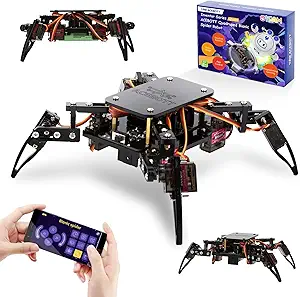 | Best for Structured Learning | Microcontroller: ESP8266 | Servos: MG90 metal servos | Charging: Type-C rechargeable | VIEW LATEST PRICE | See Our Full Breakdown |
| Kyanio 3-in-1 STEM Robotics Kit with Remote and App Control |  | Best Multi-Model Value | Piece count: 560 | Models: Machine gun robot, tracked vehicle, mechanical cannon tank | Control: 2.4 GHz remote control and app programming | VIEW LATEST PRICE | See Our Full Breakdown |
| programmable STEM robotics kit | Recommended Age |
|---|---|
| ACEBOTT QD106 Programmable Rob | 8–16 years |
| Glikid 3-in-1 STEM Robot Build | 8 years and up |
| ACEBOTT 4-in-1 Smart Robot Arm | 12-16 years |
| BeAndge 6-in-1 STEM Robotics K | 8-12 years |
| Thames & Kosmos My Robotic Pet | 8+ with adult help; 12+ independent |
| Henoda Programmable Building B | — |
| Sillbird 5-in-1 Programmable R | — |
| ELEGOO UNO R3 Smart Robot Car | 12 years and up |
| Sillbird 12-in-1 Solar Robot B | 10 years and up |
| Sillbird 5-in-1 Programmable S | 8+ |
| ELEGOO Conqueror Robot Tank Ki | 10 years and up |
| Makeblock mBot STEM Coding Rob | 8 years and up |
| ACEBOTT ESP8266 Quadruped Bion | — |
| Kyanio 3-in-1 STEM Robotics Ki | — |
More Details on Our Top Picks
ACEBOTT QD106 Programmable Robot Car Kit for Kids
Most kits in this space pick a lane — the Glikid 3-in-1 leans on app-driven fun, while BeAndge’s 6-in-1 stays purely mechanical. The QD106 is the rare option that genuinely grows with the coder. It starts kids in Scratch’s drag-and-drop blocks, then graduates them to Arduino and Python on the same hardware, which means this kit stays relevant for years rather than months. The ESP32 controller with Wi-Fi opens the door to app control on nearly any device a family already owns, and the 16 story-based tutorials do the teaching work a parent might not be able to. Compared with the ELEGOO UNO R3 kit elsewhere in this roundup, the no-soldering assembly and friendlier narrative tutorials make it far less intimidating for first-timers.
Pros:- Three programming languages (Scratch, Arduino, Python) support a multi-year learning path
- Works across computers, tablets, and phones, so no new device is needed
- 16 story-based tutorials teach concepts rather than just assembly steps
- No soldering required, keeping entry safe and frustration low
Cons:- Batteries are not included, so the kit isn’t playable out of the box
- Younger kids will likely need an adult to get through initial setup and software installation
Best for: Kids ages 8–14 who want a first programmable robot that can scale from block coding to real Python without outgrowing the hardware
Not ideal for: Families wanting an open-the-box toy with zero setup — batteries aren’t included and the learning payoff requires actual time investment
- Controller:ESP32
- Programming Languages:Scratch, Arduino, Python
- Tutorials:16 story-based tutorials
- Control Methods:iOS/Android app, IR remote
- Assembly:No soldering required
- Recommended Age:8–16 years
- Batteries:Not included
Our verdict“If you want one kit that teaches real coding skills from age 8 through middle school, this is the smartest single purchase in the lineup.”
Glikid 3-in-1 STEM Robot Building Kit with App and Remote Control
Where the ACEBOTT QD106 prioritizes a coding curriculum, the Glikid FC9017 prioritizes hands-on fun with a light coding layer — and it nails that balance. The 776 pieces feel closer to a building-block set than an electronics project, and the three builds (robot, crocodile, tank) give kids a reason to tear down and rebuild rather than assemble once and shelve it. Its STEM Coding mode in the app introduces programming logic gently, making it a friendlier on-ramp than jumping straight into Arduino. The rechargeable battery with USB-C charging is a genuine convenience the BeAndge kit can’t match, though 45 minutes of runtime per charge means charging breaks during long play sessions. Compared with the Henoda building-block robot elsewhere in this roundup, the second and third build options give it stronger repeat value.
Pros:- Three distinct builds from one 776-piece set keeps rebuilding fresh
- Four app modes including a gentle intro to coding logic
- Rechargeable battery with included USB-C cable beats disposable batteries
- Illustrated instructions make guided assembly manageable for independent kids
Cons:- Only one model can be built at a time, which invites sibling squabbles
- Remote requires two AAA batteries that aren’t included
Best for: Ages 8 and up who love building toys and want a taste of coding without a heavy curriculum commitment
Not ideal for: Parents seeking deep programming education — the coding mode is introductory compared with ACEBOTT’s Python path
- Pieces:776
- Models:Automotive robot, track crocodile, mechanical tank (one at a time)
- Controls:2.4 GHz remote, Bluetooth app
- App Modes:Control, Driving, Path, STEM Coding
- Battery:Built-in 3.7V 500mAh Li-Po
- Play Time:Up to 45 minutes per charge
- Recommended Age:8 years and up
- Warranty:1 year on parts
Our verdict“This pick makes the most sense for buyers who want maximum build-and-play variety per dollar with just enough coding to earn the STEM label.”
ACEBOTT 4-in-1 Smart Robot Arm & Tank Car STEM Coding Kit for Kids Ages 12-16
This is the most ambitious kit in this batch, and it’s aimed squarely at the kid who has already outgrown simpler sets. The 5DOF programmable robotic arm is the headline — it’s a genuinely useful introduction to real-world robotics that neither the ACEBOTT QD106 nor the Glikid 3-in-1 can touch, and pairing it with all-terrain tank treads opens up science-fair projects the car-only kits simply can’t do. With Arduino and Scratch support, plus 16 tutorials and HD assembly videos, it functions like a small classroom course in a box. The tradeoff is real, though: this is a time-heavy build best suited to patient teens or parent-child teams. If your builder is 8 or 9, the QD106’s simpler single-goal build will land far better.
Pros:- 4-in-1 configuration delivers car, tank, arm, and arm-tank builds from one base set
- 5DOF robotic arm teaches real robotics principles beyond wheeled kits
- All-terrain treads handle grass, gravel, slopes, and carpet
- Arduino and Scratch support spans beginner through advanced coding
Cons:- Assembly complexity far exceeds beginner kits and may overwhelm younger builders
- Listed age range is inconsistent across packaging (8-12 vs 12-16), so size up your child honestly
Best for: Motivated builders ages 12–16 working on science fair projects or serious robotics skills, ideally with a parent available for the longer builds
Not ideal for: Younger kids or gift-givers wanting quick gratification — a complex multi-part build with inconsistent stated age ranges invites frustration
- Configuration:4-in-1 (robot car, tank, robotic arm, robotic arm tank)
- Controller:ESP32
- Robotic Arm:5DOF programmable
- Compatibility:Arduino, Scratch
- Control:IR remote, iOS/Android app
- Tutorials:16 story-based tutorials with HD videos
- Recommended Age:12-16 years
Our verdict“The clear choice for a teen ready to graduate from toy robots to genuine programmable robotics — just don’t hand it to a beginner and walk away.”
BeAndge 6-in-1 STEM Robotics Kit for Kids Ages 8-12
Not every family wants to manage apps, accounts, and charging cables — and the BeAndge kit wisely skips all of that. Its six mechanical and circuit-based projects (reptile robot, balance car, bubble machine, fiber lamp, buzzer game) teach physics and wiring through hands-on assembly alone, making it the most screen-free option among the electronic kits here. Compared with the Glikid 3-in-1, you lose app control and coding modes entirely, but you gain project count and a lower barrier to entry — no pairing, no updates, no battery charging. The included mini screwdriver and illustrated manuals mean the box is mostly self-contained. Just budget for the hidden costs: AA batteries and bubble solution are both excluded, which slightly undercuts the value story.
Pros:- Six separate projects deliver variety and repeat engagement at a low cost
- No screens, apps, or accounts required — pure hands-on building
- Teaches circuit building and physics concepts through tangible results
- Mini screwdriver and step-by-step manuals included for self-contained assembly
Cons:- Bubble solution and AA batteries are not included, adding hidden setup costs
- Younger children in the 8-10 range will need adult assistance on several builds
Best for: Families and gift-givers wanting an affordable, screen-free introduction to circuits and mechanics across multiple builds
Not ideal for: Kids specifically wanting to learn programming — there’s no code here, just physical assembly and circuit basics
- Recommended Age:8-12 years
- Number of Projects:6
- Projects Included:Reptile robot, balance car, bubble machine, fiber lamp, buzzer wire game
- Batteries Required:Yes (AA, not included)
- Additional Requirements:Bubble solution (not included)
- Tools Included:Mini screwdriver, instruction manuals
- Material:Odorless, safety materials
Our verdict“A smart low-stakes entry point for curious kids who learn by screwing things together rather than writing code.”
Thames & Kosmos My Robotic Pet: Coding Chameleon STEM Kit
While the ACEBOTT QD106 teaches coding through screens, the Coding Chameleon proves sequencing, logic, and conditionals can live on physical action cards instead. Kids feed the chameleon cards to build programs, and the robot’s color sensor, IR sensors, and RGB LEDs make the cause-and-effect feedback immediate and delightful — it changes color, flicks its tongue, and reacts to gestures. The three play modes (Coding, Wild, Pet) give it lasting toy appeal that pure curriculum kits lack, and the 48-page manual is the kind of thoughtfully written learning material Thames & Kosmos is known for. The compromise is ceiling: unlike Arduino-based kits in this roundup, there’s no pathway to text-based programming. It’s a brilliant first step, not a long-term ladder.
Pros:- Genuinely screen-free coding via physical action cards — rare in this category
- Rich sensor interactions: color changes, tongue movement, touch and gesture response
- Three play modes keep it engaging as a toy beyond the initial build
- 48-page manual teaches real robotics concepts alongside assembly
Cons:- Ages 8+ will need adult help with the build, and independent play really starts around 12
- No progression to text-based coding limits long-term skill growth
Best for: Ages 8–12 whose parents want to teach programming logic without adding another screen to the household
Not ideal for: Older kids or ambitious coders ready for Python or Arduino — the card-based system caps out well before that
- Length:15 inches
- Play Modes:Coding, Wild, Pet
- Sensors:Color sensor, infrared sensor
- Lighting:RGB LEDs
- Manual:48 pages
- Recommended Age:8+ with adult help; 12+ independent
Our verdict“The best pick in this lineup for introducing a younger child to programming logic through play rather than a screen.”
Henoda Programmable Building Block Robot Kit with App and Remote Control
Most kits in this roundup focus on building and coding, but the Henoda model 15049 stands out for what happens after the build: 360-degree stunts, voice control, and path mode across a stated range of over 20 meters. That range beats typical Bluetooth-only kits, and the included 2.4 GHz remote means play doesn’t die when a tablet isn’t handy. Compared with the Sillbird 5-in-1 kit, which offers five separate builds, Henoda gives you one robot — but with more dynamic movement options. The tradeoff is that programming is shallower here; kids who want real coding depth will outgrow the app quickly. Also note the inconsistent age guidance in the product information, so judge readiness yourself rather than trusting the label.
Pros:- Multiple control modes including voice control, path mode, and programming
- Long control range of over 20 meters with a dedicated 2.4 GHz remote
- Glowing eyes and 360-degree stunts make finished builds genuinely fun to play with
- 468+ pieces with a step-by-step assembly guide
Cons:- Programming features are basic and won’t grow with a child’s coding skills
- Product information gives inconsistent age guidance, which can mislead buyers
Best for: Kids aged 8-10 who care more about driving, stunts, and voice commands than serious coding projects
Not ideal for: Parents seeking a genuine programming curriculum — the coding features here are basic compared with Arduino-based kits like the ELEGOO Smart Robot Car
- Brand:Henoda
- Model:15049
- Pieces:468+
- Control:Bluetooth app and 2.4 GHz remote
- Control distance:Over 20 meters
- Material:ABS
- Age range:8 years and up
- Warranty:90 days against manufacturer defects
Our verdict“Pick this for a kid who wants an expressive remote-control robot that happens to offer light programming — not the reverse.”
Sillbird 5-in-1 Programmable Robot Building Kit with App and Remote Control
With a stated age range starting at 6 years old, this Sillbird kit reaches younger kids than almost anything else in this lineup — the Henoda robot and the second Sillbird 5-in-1 kit both start at 8, and the ELEGOO Smart Robot Car at 12. The five distinct builds (robot, car, tank, dinosaur, or a custom model) mean the 488 pieces get reused rather than sitting in a bin, which stretches the value of a single purchase. App and remote dual control keeps things flexible for households where screen time is limited. The tradeoffs are real: up to 40 minutes of play per charge will end sessions abruptly, and a full rebuild from 488 pieces is a big ask for a six-year-old without an adult alongside. Treat it as a collaborative project, not a solo one.
Pros:- Five build options plus custom designs from one 488-piece set
- Lowest starting age in this batch at 6 years old
- Both Bluetooth app and physical remote control included
- Rechargeable battery removes ongoing battery costs
Cons:- Only about 40 minutes of play per charge
- A 488-piece assembly is demanding for the youngest recommended users
Best for: Families with kids aged 6-8 who want a rebuildable, multi-model kit to work on together
Not ideal for: Households wanting long uninterrupted play sessions — the 40-minute battery cap cuts things short
- Brand:Sillbird
- Model:US-B897R1
- Pieces:488
- Age range:6 years and up
- Build options:Robot, car, tank, dinosaur, or custom model
- Control:Bluetooth app and remote
- Battery:Rechargeable
- Play time:Up to 40 minutes
Our verdict“The most age-accessible entry point in this batch, best bought as a parent-child building project.”
ELEGOO UNO R3 Smart Robot Car Kit V4 with Camera
This is the only kit in this batch where actual text-based programming in the Arduino IDE is the point rather than an afterthought. The ESP32-based camera module enables FPV video, and the sensor suite — line tracking, obstacle avoidance, auto-follow — turns abstract coding concepts into visible, physical behavior. Compared with app-driven kits like the Sillbird 5-in-1 or Henoda robot, whose programming amounts to tap-to-command sequences, this teaches skills that transfer directly to high school and beyond. The catch: it’s rated for 12 years and up, the highest floor in the batch, and first-time builders will likely need adult help with wiring and uploading sketches. The 2000 mAh battery and half-year warranty round out a kit aimed at serious learners rather than casual play.
Pros:- Genuine Arduino IDE programming with skills that transfer to advanced STEM work
- FPV camera plus line tracking, obstacle avoidance, and auto-follow behaviors
- Complete package including controller, sensors, motors, remote, and rechargeable battery
- Guided tutorial and example programs ease the learning curve
Cons:- Younger or first-time builders will need adult guidance
- Assembly and programming require patience before any payoff
Best for: Teens and pre-teens (12+) ready to move past block coding into Arduino programming with real sensors and a camera
Not ideal for: Kids under 12 or anyone wanting instant play out of the box — assembly plus programming means results aren’t immediate
- Brand:ELEGOO
- Model:US-EL-KIT-012
- Controller:ELEGOO UNO R3
- Camera and Wi-Fi module:ESP32-WROVER-based
- Battery:2000 mAh rechargeable lithium-ion
- Control methods:App and IR remote
- Features:FPV video, line tracking, obstacle avoidance, auto follow
- Programming environment:Arduino IDE
- Recommended age:12 years and up
Our verdict“The pick here for families who want coding education, not just a remote-control toy with a ‘STEM’ label.”
Sillbird 12-in-1 Solar Robot Building Kit, 190 Pieces
Every other kit in this roundup depends on an app, a remote, or a battery — this one runs on sunlight. That makes it the only genuinely screen-free option in the batch, and the 12 buildable models from just 190 pieces give it the best rebuild-to-piece ratio here. Where the Sillbird 5-in-1 kits require 488 pieces for five models, this achieves double the model count with under half the parts, making it far more manageable for independent building. It’s also a natural conversation starter about renewable energy. The tradeoff is inherent to the concept: no sun (or strong lamp) means no movement, so an overcast afternoon kills the fun. And since there’s no motor controller or app, there’s no programming at all — it’s an engineering kit, not a coding one.
Pros:- Twelve distinct models from a modest 190-piece set
- Solar power introduces renewable energy concepts hands-on
- Completely screen-free with no batteries or charging to manage
- Step-by-step instructions support independent building
Cons:- Operation depends entirely on adequate sunlight or a strong artificial light source
- No programming, app, or remote-control features at all
Best for: Parents who want hands-on engineering learning with zero screens, batteries, or app accounts
Not ideal for: Kids drawn to robotics specifically for coding or remote-control play — there’s no programming or powered driving here
- Brand:Sillbird
- Model:US-SB-SolarRobot
- Buildable models:12
- Pieces:190
- Power source:Solar power or strong artificial light
- Recommended age:10 years and up
- Educational objective:Dexterity and engineering skills
Our verdict“A great engineering-first kit for screen-free households — just don’t expect it to teach a line of code.”
Sillbird 5-in-1 Programmable STEM Robot Building Kit with Remote and App Control
This kit’s defining feature is progressive difficulty across its five builds, which quietly separates it from the otherwise near-identical Sillbird 5-in-1 (B0DHZKZP49). Where that sibling kit targets kids as young as 6 with one flat difficulty level, this version starts at age 8 and ramps up — a structure that keeps a child engaged for months instead of weeks. Bluetooth app control, path programming, and adjustable head, arms, and tail give the finished builds personality beyond simple driving. Compared with the ELEGOO Smart Robot Car, the programming is far simpler, which is exactly the point: this is the bridge between toy coding kits and real Arduino work. The 40-minute play cap per charge is the main frustration, and some younger builders will still need an adult during the harder builds.
Pros:- Progressive difficulty across five models sustains long-term engagement
- Adjustable head, arms, and tail make builds feel alive
- Both app and physical remote control included
- Rechargeable battery supports up to 40 minutes of play
Cons:- Play time capped at around 40 minutes per charge
- Harder builds and programming steps may require adult help for younger kids
Best for: Kids aged 8-10 who have outgrown single-build kits and benefit from challenges that increase step by step
Not ideal for: Older kids (11+) who would be better served jumping straight to Arduino-based kits like the ELEGOO Smart Robot Car
- Models:5-in-1: robot, dinosaur, car, tank, and more
- Piece count:488
- Recommended age:8+
- Control methods:Bluetooth app and remote control
- Play time:Up to 40 minutes per charge
- Features:Basic programming, path control, adjustable head, arms, and tail
Our verdict“The best choice when you want a kit that grows with your child’s building skills rather than being mastered in a weekend.”
ELEGOO Conqueror Robot Tank Kit with UNO R3, Arduino Compatible
Most beginner kits in this roundup stop at line following and remote control, but the Conqueror pushes further with a live FPV camera stream powered by the OV2640 lens and ESP32-WROVER Wi-Fi module. Watching the tank roll across the floor from a first-person phone view changes how kids engage — it feels like operating a real rover rather than a desk toy. Compared with the Makeblock mBot, this kit offers a clearer coding ladder: kids start in block-based mode, then graduate to genuine Arduino IDE programming, which is where the durable STEM value sits. The stainless-steel tracked chassis with suspension also outclasses the plastic frames of kits like the Kyanio 3-in-1. The tradeoff is complexity: assembly can frustrate a 10-year-old without an adult nearby, and Arduino-level tinkering assumes some prior coding comfort.
Pros:- Live FPV camera streaming makes driving feel genuinely immersive
- Clear progression from block-based coding to Arduino IDE
- Five distinct modes (obstacle avoidance, line tracking, auto-follow and more) keep play varied
- Sturdy stainless-steel tracked chassis with real suspension
- No soldering required, and tools and instructions are included
Cons:- Assembly is challenging for younger builders without adult assistance
- Advanced Arduino customization requires prior coding knowledge
- Heavier and more complex than simple snap-together alternatives
Best for: Kids 10 and up (with a parent’s help) and classrooms that want a long-term path from block coding into real Arduino programming.
Not ideal for: Families wanting a quick 20-minute build-and-play session — assembly is involved and advanced modes require actual coding knowledge.
- Controller:UNO R3 (Arduino compatible)
- Wireless module:ESP32-WROVER Wi-Fi
- Camera:OV2640 with servo-mounted adjustable angle
- Modes:FPV driving, IR remote, obstacle avoidance, line tracking, auto-follow
- Battery:7.4 V battery
- Assembly:No soldering required
- Recommended age:10 years and up
Our verdict“This pick makes the most sense for families or classrooms that want a robot kids can grow with for years rather than outgrow in a weekend.”
Makeblock mBot STEM Coding Robot Kit for Kids Ages 8–12
The mBot earns its place by being the easiest genuine entry point in this lineup. Where the ELEGOO Conqueror demands patience and the ACEBOTT spider kit needs a separately purchased battery, the mBot goes from box to driving robot in roughly 15 minutes of assembly, then hands kids a gentle on-ramp through Scratch-style drag-and-drop coding in mBlock before any Arduino talk begins. That low floor matters: an 8-year-old can build it, control it, and complete line-following and obstacle-avoidance activities in a single afternoon. Its ecosystem is the quiet advantage here — 100+ add-on modules and 500+ compatible parts, including LEGO pieces, mean the platform expands instead of being retired. The drawback is simplicity itself: no camera, no FPV, and hardware that older kids may find limiting within a year or two. Batteries are also not in the box.
Pros:- Assembles in about 15 minutes for near-instant gratification
- Scratch-to-Arduino coding path scales with a child’s ability
- Huge expansion ecosystem with 100+ modules and LEGO compatibility
- Tutorials, coding cards, and app activities guide complete beginners
Cons:- Four AA batteries and a CR2025 remote battery are not included
- Basic sensor set with no camera or advanced features
- May be outgrown by experienced young coders within a couple of years
Best for: Ages 8–12 getting their first programmable robot, especially parents who want a frustration-free first build with room to expand later.
Not ideal for: Teens or kids already comfortable with coding — the hardware ceiling arrives quickly compared with Arduino kits like the ELEGOO Conqueror.
- Recommended age:8 years and up
- Programming platforms:Scratch (mBlock) and Arduino
- Functions:Remote control, line following, obstacle avoidance
- Assembly time:About 15 minutes
- Robot batteries:4 AA (not included)
- Remote battery:CR2025 (not included)
- Expandability:Makeblock add-on packs, 100+ modules, 500+ parts, LEGO parts
Our verdict“The mBot is the right first robot: fast to build, forgiving to code, and expandable enough that it won’t be abandoned next month.”
ACEBOTT ESP8266 Quadruped Bionic Spider Robot STEM Kit
Legged robots are rare at this price tier, and the ACEBOTT Quadruped uses that novelty well. A walking spider is inherently more engaging than another wheeled car — compare it to the Makeblock mBot, which drives on two wheels, or the ACEBOTT QD106 robot car from the same brand — and the gait programming behind six movement modes and nine preset actions teaches mechanics concepts that wheeled kits simply can’t. What sets it apart educationally is the 8 structured lessons with a paper manual, plus pre-burned programs so the robot walks the moment assembly ends, before any coding begins. That sequence — build, play, then learn to program — suits classroom pacing better than open-ended kits. The MG90 metal servos and Type-C recharging feel more durable than typical plastic-gear competition. The main annoyance: the required flat-top battery isn’t included, so factor in an extra purchase before gifting.
Pros:- Pre-burned programs deliver immediate play after assembly
- 8 structured lessons and paper manual make it genuinely classroom-ready
- Walking quadruped design teaches mechanics wheeled kits can’t
- Metal MG90 servos and Type-C recharging add durability and convenience
Cons:- Required flat-top battery is not included
- Fewer coding pathways than Arduino-focused kits like the ELEGOO Conqueror
- Legged locomotion drains batteries faster than simple wheeled builds
Best for: Teachers running structured STEM lessons and kids 8+ who want a robot that moves unlike anything wheeled, with a curriculum already built in.
Not ideal for: Gift-givers wanting a complete out-of-box package — the missing flat-top battery means it won’t run on day one without an extra order.
- Microcontroller:ESP8266
- Servos:MG90 metal servos
- Charging:Type-C rechargeable
- Movement modes:6
- Preset actions:9
- Age range:8+
- Battery:Flat-top battery required (not included)
- Control:App remote control
Our verdict“A strong fit for educators and curious kids who want lesson-driven learning with a robot that literally walks off the beaten path.”
Kyanio 3-in-1 STEM Robotics Kit with Remote and App Control
If the appeal is rebuilding rather than programming depth, the Kyanio kit delivers three distinct models — a machine gun robot, a tracked vehicle, and a mechanical cannon tank — from one 560-piece set. That rebuild loop gives it more longevity than single-build kits like the Makeblock mBot, and unlike the Sillbird 12-in-1 solar kit, each model here is motorized and programmable through the app, not just a static assembly. The color-coded blocks and step-by-step instructions keep younger builders on track, and the combination of a 2.4 GHz remote and app control means kids can drive first and code second. Where it falls short of the ELEGOO Conqueror is transparency: the app and device compatibility aren’t specified, and there’s no published battery life or charge time. Treat it as a building-and-play kit with light coding rather than a serious programming platform.
Pros:- Three distinct motorized models from a single 560-piece set
- Both 2.4 GHz remote and app programming control options
- Color-coded pieces and step-by-step instructions ease assembly
- USB Type-C charging is convenient and modern
Cons:- Required app and device compatibility are not specified
- No published battery life or charging time
- Coding features are basic compared with Arduino kits like the ELEGOO Conqueror
Best for: Kids who love building and rebuilding — families wanting multiple motorized models from one box with casual app coding on the side.
Not ideal for: Buyers focused on real programming instruction — the vague app details and thin coding depth make it a weaker choice than Arduino-based kits for learning to code.
- Piece count:560
- Models:Machine gun robot, tracked vehicle, mechanical cannon tank
- Control:2.4 GHz remote control and app programming
- Charging:USB Type-C
- Material:ABS
- Assembly:Color-coded blocks and step-by-step instructions
Our verdict“This option stands out for builders who want variety and motorized play on a budget, not for families prioritizing a serious coding curriculum.”
How We Picked
My ranking rests on four factors, weighted in this order: coding depth, age-appropriate usability, build quality and documentation, and long-term value. Coding depth means the kit teaches real programming concepts — block coding, Scratch-style logic, or actual Arduino sketches — rather than just driving a robot around with a joystick. A kit with fewer pieces but a genuine coding environment beat a flashy 12-model kit with app-only remote control every time, because that’s the difference between a STEM product and a toy.
Usability covered instruction clarity, app stability, assembly time, and how much adult help a typical 8- or 12-year-old would realistically need. Long-term value considered expansion options, spare parts availability, and whether the electronics (sensors, controller boards) could be reused for other projects — a major advantage for the Arduino-compatible kits. Kits ranked lower not because they’re bad products, but because they serve narrower audiences: solar kits without programming, for instance, landed lower in a roundup specifically about programmable kits.
Factors to Consider When Choosing Programmable STEM Robotics Kits
Before choosing a kit, match it to the child’s actual coding experience and attention span — not their age on the box. These are the factors that most often make or break the purchase.Toy Coding Versus Real Programming
The most common mistake in this category is buying a ‘programmable’ kit that only offers joystick-style app control with a few preset actions. True coding kits let kids write sequences, loops, and conditionals — usually through Scratch-style blocks or Arduino’s C-based language. If the product description never shows a screenshot of the coding interface, treat that as a warning sign. Kids who code their robot’s behavior learn debugging, logic, and iteration; kids who only drive it learn nothing transferable. When in doubt, look for keywords like drag-and-drop programming, Scratch compatibility, or Arduino IDE support.
Block Coding Versus Arduino: Which Path?
Block-based platforms like Makeblock’s mBlock are forgiving and instant — kids see results in minutes and can graduate to Python later. Arduino kits (the ELEGOO line, ACEBOTT’s QD106 and spider) involve wiring breadboards, uploading sketches, and reading error messages, which is more frustrating but far closer to what real engineers do. My general guidance: block coding suits ages 8–11, and Arduino suits 12 and up or younger kids with a technically inclined adult nearby. Jumping straight to Arduino with an impatient child is the fastest way to kill their interest in robotics. The best kits, like the mBot, offer both paths in one product.
Multi-Model Appeal Versus Single-Build Depth
Kits advertising 5-in-1, 6-in-1, or 12-in-1 configurations look like better value, and for easily bored kids they often are. The tradeoff is that each model tends to be simpler, and rebuilding requires partially disassembling the previous robot, which many kids never bother doing — the kit effectively becomes a one-build product anyway. Single-build kits like the robot arms and walking robots take longer but produce something kids are prouder of and keep on a shelf. If you do buy a multi-model kit, pick one where the models share a common controller base so switching is less painful. Also check whether all models are programmable or only some of them.
Batteries, Charging, and Hidden Costs
Nothing derails a birthday gift faster than a robot that needs eight AA batteries you don’t have. Check the power system before buying: rechargeable lithium packs (found in Makeblock and ELEGOO kits) cost more upfront but pay off quickly, while AA-powered kits burn through batteries with motors and LEDs running. Solar kits avoid batteries entirely but need strong direct light to do anything, which disappoints kids expecting indoor play. Also verify what’s included for programming — some Arduino kits assume you already own a laptop and USB cable, and a few cheaper kits omit tools needed for assembly. Budget an extra twenty minutes and a small accessory allowance for most kits in this range.
App Quality and Instruction Clarity
Hardware is rarely the weak link in this price bracket — the companion app and manual usually are. Common failure points I weighed heavily: apps that drop Bluetooth connection, instructions with poorly translated English, and apps that only support older Android versions or specific phone models. Established brands (Makeblock, ELEGOO, Thames & Kosmos) maintain their apps with updates, while many budget multi-packs ship with apps that receive no support after launch. Before buying, check the manufacturer’s app store listing and its last update date. A gorgeous robot with a broken app is just an expensive paperweight.
Room to Grow: Expandability and Reusable Parts
The best kits outlast their first week. Makeblock’s mBot supports dozens of add-on packs and a large community of project tutorials, and Arduino-compatible kits let kids reuse the controller, sensors, and motors in entirely custom builds once they outgrow the stock design. That reuse value is why I rank Arduino kits highly for teens despite the steeper learning curve — the components become a mini electronics lab rather than a finished toy. Closed-system kits with proprietary parts offer none of this. If your child shows sustained interest, an expandable platform is worth double the price of a disposable one. Think of the first kit as tuition; the second project should reuse its brain.
Frequently Asked Questions
What age is the right age to start with a programmable robotics kit?
Around 7 or 8 is realistic for most kids, provided the kit uses block-based coding rather than text. Kits like the Thames & Kosmos Coding Chameleon push down to age 6 by teaching sequencing logic with physical buttons, no screen required. Between 8 and 11, options like the Makeblock mBot or Henoda building kits hit the sweet spot of hands-on assembly plus drag-and-drop programming. Kids 12 and up can handle Arduino-based kits such as the ELEGOO UNO R3 car or ACEBOTT spider robot, where wiring and code uploads demand more patience. Honestly, adult interest matters as much as age — a parent who codes alongside a 9-year-old will get further than a hands-off parent with a 13-year-old.
Do these kits actually teach real coding, or are they just toys?
It splits roughly down the middle in this lineup. Arduino-compatible kits teach genuine C/C++ programming that transfers directly to college-level engineering work, and Makeblock’s mBot teaches Scratch blocks with a clear path into Python. By contrast, several multi-model kits marketed as ‘programmable’ offer app control with pre-programmed actions — fun, but closer to remote-control cars than computer science. The tell is whether the product shows a programming interface with loops and conditionals, or just a virtual joystick. If coding education is the goal, verify that specific feature before anything else, because packaging language is unreliable in this category.
Is a solar-powered robot kit a good first step into robotics?
Solar kits like the Sillbird 12-in-1 are appealing because they need no batteries and teach gear mechanics well, but they’re a niche entry point. The solar panel produces very little power, so robots move slowly and only under strong direct sunlight or a bright lamp — indoor performance is disappointing, and kids used to fast app-controlled toys may lose interest. There’s also no programming involved, which limits what they teach about coding specifically. I’d position a solar kit as a companion purchase for a mechanically curious child, not a substitute for a programmable kit. For a true first robotics kit, a block-coding option like the mBot delivers more learning per dollar.
Do I need to know programming myself to help my child?
For block-based kits, no — the drag-and-drop interfaces are self-explanatory, and tutorial sequences walk kids through their first programs within minutes. Arduino kits are different: expect to help with driver installation, wiring, and deciphering error messages, especially for kids under 13. The good news is that ELEGOO and ACEBOTT include sample code and detailed wiring diagrams, so an adult with zero coding background can follow along and learn alongside the child. If neither parent has time for that, stay with a self-guided platform like Makeblock, which holds a child’s hand more thoroughly. Scheduling a first build session together, rather than handing over the box solo, dramatically improves outcomes with any kit.
How much should I spend, and when is a pricier kit worth it?
The budget multi-model kits work well as gifts for kids you’re not sure will sustain interest — if the robot sits in a closet after a week, the loss stings less. Spend more when the child has already shown repeated interest in building or coding, because pricier kits like the mBot or ELEGOO Conqueror offer expandability, better apps, and reusable electronics that justify the gap. As a rule, the money goes toward software quality and component reusability rather than more pieces, so don’t equate piece count with value. A mid-range kit from an established brand almost always outperforms a budget kit with triple the parts. The premium tier (robot arms, spider robots) only makes sense for teens with proven patience for multi-day builds.
Conclusion
After comparing all 14 kits, the right choice depends less on specs and more on who’s opening the box. For best overall, the Makeblock mBot stands out for its polished block-coding platform, smooth app, and room to grow into Python — the safest bet for most families. For best value, the Sillbird 5-in-1 and Glikid 3-in-1 kits deliver multiple builds and app control at a gift-friendly price, ideal for testing a child’s interest. For best premium, the ELEGOO Conqueror Tank and ACEBOTT 4-in-1 Robot Arm reward committed teens with real Arduino programming and components they’ll reuse for years. For beginners and younger kids, the Thames & Kosmos Coding Chameleon teaches programming logic without a screen, while the ACEBOTT QD106 makes sense as a first Arduino project for a parent-child team. Whatever you pick, match the kit to your child’s patience level — a slightly simpler kit they finish beats an ambitious one that ends in frustration.
Fall Picks
fall essentials
As an affiliate, we earn on qualifying purchases.